Charts, shapes, pictures and embedded objects
Word documents carry more than text: charts, drawing shapes, metafile pictures and embedded files. This page shows what DocWright renders, and how to get embedded files out.
Charts
Charts are drawn from the values Word cached in the chart: clustered and stacked bar and column, line, pie, doughnut, area and scatter, with axes, gridlines, tick labels, legends in every position, titles, data labels and theme colours. The geometry is measured against Word's own PDF export.
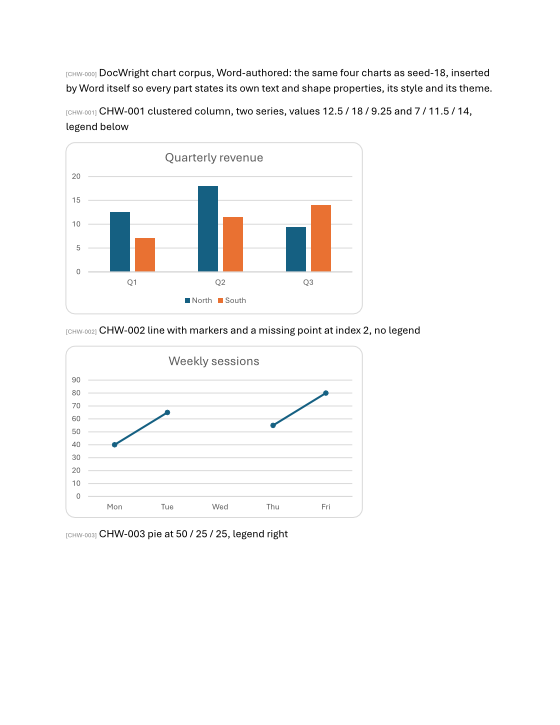 Column and line
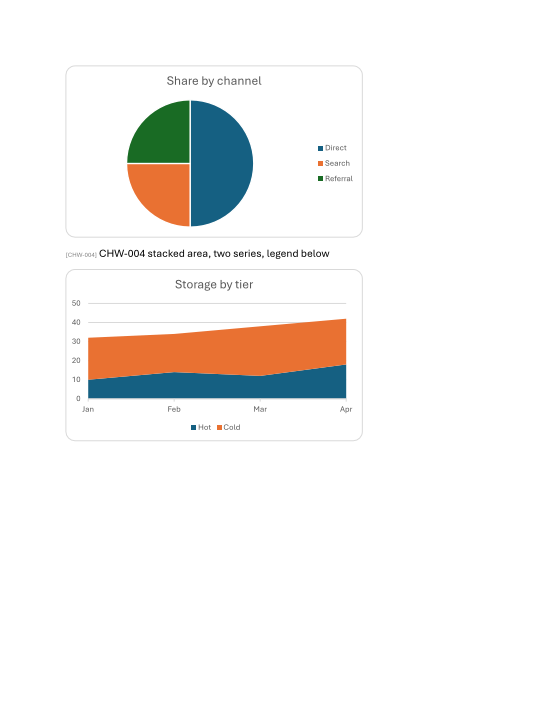 Pie and stacked area
A chart that states its own axis range, units, number format, fonts, line styles or colours gets them. Where it states nothing, Word's defaults are used. A stated scale that can't be drawn (minimum above maximum, for example) is reported as DXP2009, and the automatic scale is used instead.
Shapes
All 187 of Word's preset shapes, with solid and gradient fills, outlines, arrowheads, text inside shapes, groups, rotation and flips:
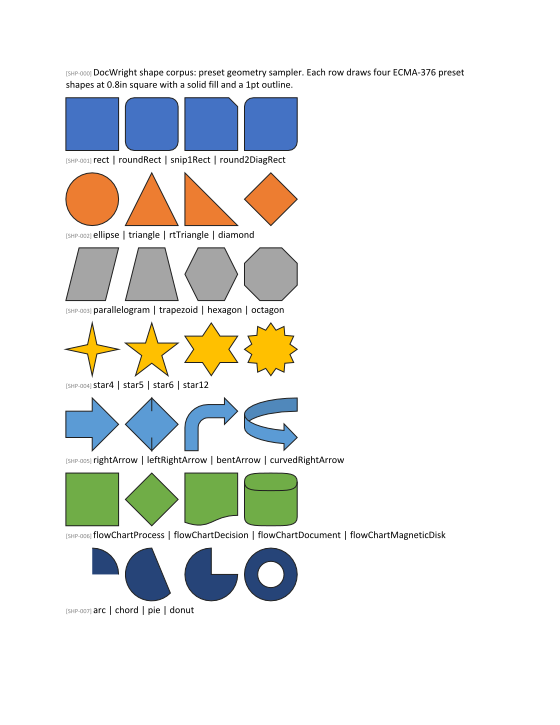
Shadows, glow, soft edges, 3-D effects and SmartArt layout are not drawn.
Metafiles and legacy pictures
- EMF pictures are played back into the page as vectors, so they stay sharp at any zoom.
- WMF pictures are detected and reported (
DXP2007). Playback is EMF only. - VML pictures and shapes from older documents render.
- EPUB output can't carry metafiles, so they are dropped there, with a diagnostic.
Embedded objects (OLE)
An embedded file, such as a spreadsheet or attachment inserted with Insert › Object, is preserved byte for byte, never opened or run, and can be extracted:
using DocWright;
using DocWright.Dom;
using DocWright.Ole;

using FileStream input = File.OpenRead("with-attachment.docx");
using WordDocument document = converter.Load(input);

IEnumerable<OleObject> embedded = document.Sections
    .SelectMany(s => s.Blocks).OfType<Paragraph>()
    .SelectMany(p => p.Inlines).OfType<ShapeRef>()
    .Select(shape => shape.OleObject).OfType<OleObject>();

foreach (OleObject ole in embedded)
{
    Console.WriteLine($"{ole.ProgId}, {ole.Kind}, shown as icon: {ole.ShownAsIcon}");

    // The payload is preserved byte for byte. OlePayload needs a seekable stream,
    // and a part's stream is not one, so buffer it first.
    PreservedPart part = document.Preservation.Parts.Single(p => p.PartUri == ole.PartUri);
    using var payloadStream = new MemoryStream();
    using (Stream partStream = part.OpenStream())
    {
        partStream.CopyTo(payloadStream);
    }

    payloadStream.Position = 0;
    using OlePayload payload = OlePayload.Open(payloadStream);
    // EmbeddedFileName is the path the file had on the author's machine: use the name only.
    string name = Path.GetFileName(payload.EmbeddedFileName ?? payload.EmbeddedLabel ?? "attachment.bin");
    Console.WriteLine($"  {payload.Kind}: {name}");

    if (payload.TryOpenNativeContent(out Stream? content))
    {
        using (content)
        using (FileStream file = File.Create("extracted-" + name))
        {
            content!.CopyTo(file);
            Console.WriteLine($"  saved {file.Length:N0} bytes");
        }
    }
}
Output (a Word-authored document with an embedded text file)
Package, Embedded, shown as icon: False
  PackagedFile: embed-me.txt
  saved 47 bytes
OlePayload.Kindsays what the payload is: an OLE 1.0PackagedFile(which carries the original file name), aContentsorPackagestream, orUnrecognized, with its streams still readable.EmbeddedFileNameis the path the file had on the author's computer. Use only its file name, and treat the content as untrusted.paragraph.AppendOleObject(...)in the editing API inserts a new embedded object with a preview image.DocWright.Olealso reads compound files directly: the container format of.docfiles, encrypted Office packages and embedded objects.