Equations
An equation (m:oMath, or a display paragraph m:oMathPara) is an OfficeMath inline: its markup as read, written back byte for byte, and a model of every Office Math structure that layout draws by the face's OpenType MATH table, as Word lays it out.
Read the equations
using DocWright;
using DocWright.Dom;
using DocWright.Dom.Equations;

// Every m:oMath / m:oMathPara is an OfficeMath inline: the markup as read (written back byte for byte)
// and the model layout draws.
using WordDocument document = converter.Load(File.OpenRead("equations.docx"));
var equations = document.Sections.SelectMany(s => s.Blocks).OfType<Paragraph>()
    .SelectMany(p => p.Inlines.OfType<OfficeMath>()).ToList();
foreach (OfficeMath math in equations)
{
    Console.WriteLine($"{(math.IsDisplay ? "display" : "inline ")}  {math.ToLinearText()}");
}
ToLinearText() is the equation as Word's equation editor shows it in Linear mode (UnicodeMath). It is what GetText, a plain-text, HTML or Markdown save carry for the equation. The model, in DocWright.Dom.Equations, covers fractions, scripts, radicals, sums and integrals, delimiters, matrices, equation arrays, accents, bars, functions, limits, group characters, boxes and phantoms, with Office Math's default for every property the markup leaves out.
The math face
using DocWright.Fonts;

// Equations are set in the face's OpenType MATH table; the bundle's STIX Two Math stands in for Cambria Math.
var engine = new FontEngine(new FontEngineOptions { IncludeSystemFontDirectories = false });
FontFace face = engine.Resolve(new FontKey("Cambria Math"));
face.TryGetMathTable(out MathTable? table);
Console.WriteLine($"{face.FamilyName}: axis {table!.Constants.AxisHeight}, fraction rule {table.Constants.FractionRuleThickness} of {face.UnitsPerEm}");
Word sets equations in Cambria Math, which cannot be shipped. DocWright bundles STIX Two Math (SIL OFL) as its stand-in: of six open faces with a MATH table it is the nearest in advances and design, though no open face is metric-compatible. Where the machine has Cambria Math and system fonts are on, equations are set in it.
Laid out and drawn
using DocWright;
using DocWright.Core.Rendering;
using DocWright.Layout;

// Each laid-out equation leaves a MathRegion: its box, baseline and node key. Renderers ignore it.
LaidOutConversion laidOut = converter.Layout(document, new ConvertOptions { EmitSourceReferences = true });
var regions = laidOut.Document.Pages.SelectMany(p => p.Primitives).OfType<MathRegion>().ToList();
Console.WriteLine($"regions: {regions.Count}, display: {regions.Count(r => r.IsDisplay)}");

// Word counts an equation as one word of its runs' characters.
DocumentStatistics statistics = DocumentStatistics.Compute(document);
Console.WriteLine($"words: {statistics.Words}, characters: {statistics.Characters}");
Output
inline a/b
inline x^2+y^2=r^2
inline ∑_(i=1)^n▒i
inline ∫_0^1▒(f(x)dx)
display x=(-b±√(b^2-4ac))/2a
display ∑_(k=0)^∞▒x^k/(k!)=e^x
display (■(a&b@c&d))
display █(x+y=3@x-y=1)
inline sinx
inline lim_(n→∞)a_n
display ∫_0^π▒(sinxdx)=2
STIX Two Math: axis 258, fraction rule 68 of 1000
regions: 13, display: 5
words: 67, characters: 320
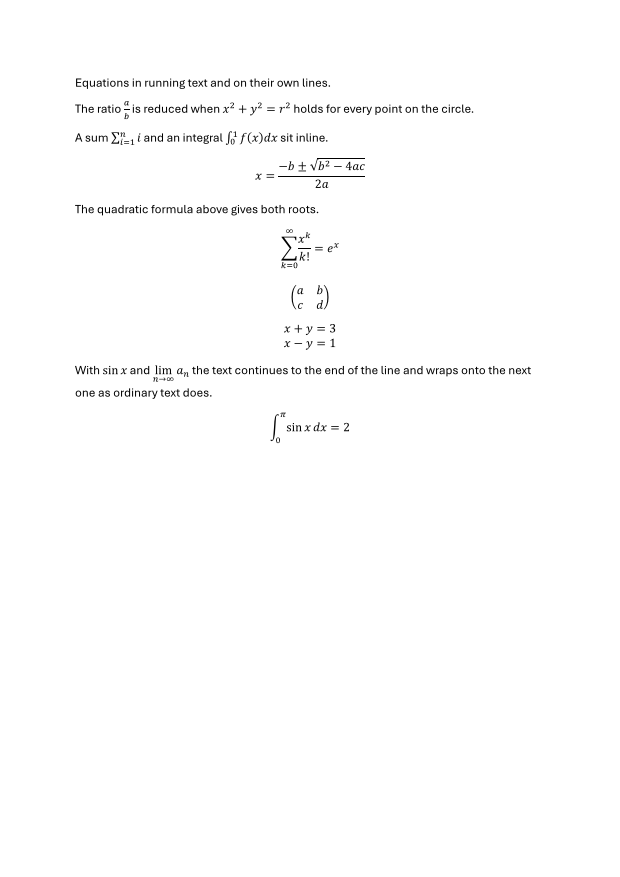
Layout follows Word's measured rules: scripts at 71 % and 58 % of the text in the face's script forms, fraction bars on Word's 1/600 in grain, a display equation's fractions at full size at every depth, and a display line of the equation's box with the face's leading above it. A display paragraph is centred as a group; an inline equation breaks before an operator when it does not fit. A custom renderer draws each glyph run by the glyph id its cluster map names: a grown parenthesis or a script form has no character of its own.
Build an equation
using DocWright.Dom;
using DocWright.Dom.Editing;
using DocWright.Dom.Equations;

// A new equation from linear text (UnicodeMath, as Word's Linear mode writes it), inserted at a position.
using var document = new WordDocument();
document.AppendSection();
Paragraph intro = document.AppendParagraph("The roots of ax² + bx + c = 0 are");
Paragraph display = document.AppendParagraph();
OfficeMath quadratic = OfficeMath.FromLinearText("x=(-b±√(b^2-4ac))/2a", isDisplay: true);
EquationEdit inserted = document.InsertEquation(DocumentPosition.InParagraph(display, 0), quadratic);
Console.WriteLine($"inserted: {quadratic.ToLinearText()}, caret at {inserted.After}");
OfficeMath.FromLinearText reads UnicodeMath as Word's Linear mode writes it: / fractions, _ and ^ scripts, √, n-ary operators with ▒, brackets, ■(a&b@c&d) matrices, █(…@…) equation arrays, function names with U+2061. Parentheses that only group an operand are dropped, as Word drops them; 〖 〗 groups invisibly. What it cannot read stays text. An equation an edit created or changed is written from its model as OMML Word reopens without repair; one never edited is still written byte for byte.
Type into an equation
using DocWright.Dom;
using DocWright.Dom.Editing;
using DocWright.Dom.Equations;

// An empty equation, then a fraction in it: the caret goes to the empty numerator; type, then the denominator.
Paragraph inline = document.AppendParagraph("A half is ");
var half = new OfficeMath(isDisplay: false);
document.InsertEquation(DocumentPosition.InParagraph(inline, 10), half);
EquationEdit fraction = document.InsertMathStructure(MathPosition.Start(half), new MathFraction());
EquationEdit numerator = document.InsertMathText(fraction.After, "1");
document.InsertMathText(numerator.After.Parent()!.Child(0, 1), "2");   // path 0.0.1: the denominator
Console.WriteLine($"typed: {half.ToLinearText()}");

// Each edit is one undoable DocumentEdit, newest first.
EquationEdit typo = document.InsertMathText(new MathPosition(half, new[] { 0, 0, 1 }, 1), "9");
Console.WriteLine($"with a typo: {half.ToLinearText()}");
typo.Edit.Undo();
Console.WriteLine($"undone: {half.ToLinearText()}");
A MathPosition names a slot by its path (the line, then pairs of an element's index and one of its MathElement.Slots) and an offset counted as a paragraph counts: a run's characters one each, a structure one. InsertMathText, DeleteMath and InsertMathStructure are each one DocumentEdit, and say where the caret goes next; a structure takes the selected offsets as its base.
Linear and Professional, Math AutoCorrect
LinearizeEquation(math) shows an equation in Linear form, as Word's Convert > Linear does: each line becomes its linear text followed by a space, (a+b)/c^2 . BuildUpEquation(math) builds it up again, as Convert > Professional does: the linear text becomes structures, and structures a line already has stay. Either is one undo step, and an empty edit when there is nothing to convert. Word opens DocWright's Linear equation as its own and builds it up to the same fraction.
After a character typed into an equation, CorrectMathAfterCharacter(caret) is Word's Math AutoCorrect: when that character ends a control word (\alpha, \le, \infty), the word becomes its symbol. A space that ends it goes with it, and any other character that is not a letter or a digit stays; names are case-sensitive, and an unknown name stays as typed. MathAutoCorrect.Entries is DocWright's own table of 183 standard names, each checked against Word's entry. The correction is its own undo step, so undoing it gives the word back.
Linear text reads a factorial with its operand, as Word builds it: n!/k! is n! over k!, and (a+b)!/c keeps the brackets with the factorial in the numerator.
Where the caret goes
using DocWright;
using DocWright.Core.Rendering;
using DocWright.Layout;

// With source references, layout says where every slot is and where each of its offsets stands.
LaidOutConversion laidOut = converter.Layout(document, new ConvertOptions { EmitSourceReferences = true });
foreach (MathSlotRegion slot in laidOut.Document.Pages[0].Primitives.OfType<MathSlotRegion>()
             .Where(s => s.SourceKey == half.NodeId.Value))
{
    Console.WriteLine($"slot {string.Join(".", slot.Path)}: {slot.Stops.Count} stops, size {slot.FontSize}, baseline {slot.Baseline}");
}
Output
inserted: x=(-b±√(b^2-4ac))/2a, caret at 0:3
typed: 1/2
with a typo: 1/29
undone: 1/2
slot 0.0.0: 2 stops, size 142tw, baseline 2273tw
slot 0.0.1: 2 stops, size 142tw, baseline 2491tw
slot 0: 2 stops, size 200tw, baseline 2390tw
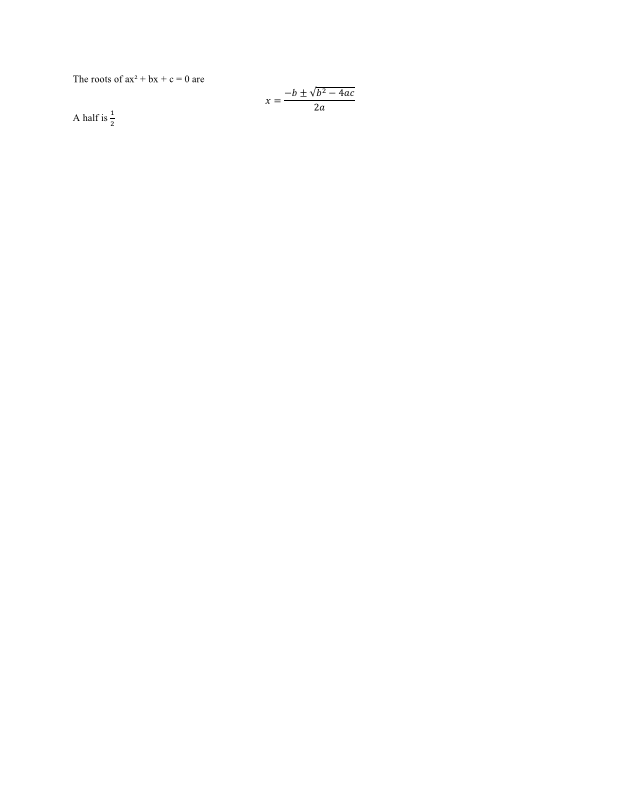
With source references on, layout emits a MathSlotRegion per slot it draws, with a MathCaretStop for every offset, so an editor can draw a caret and hit-test a point inside an equation. LayoutSessionOptions.ShowMathPlaceholders lays an empty slot out as wide as Word's dotted placeholder; renderers draw nothing for it.