Fonts and complex scripts
DocWright lays text out with the real font files, just as Word does, so line breaks and page breaks match. It needs the fonts your documents use. This page covers where it looks for them, what happens when one is missing, and how complex scripts are shaped.
Where fonts come from
DocWright searches, in order:
the folders in
ConvertOptions.FontDirectories;the operating system's font folders, recursively:
Platform Folders Windows %WINDIR%\Fonts,%LOCALAPPDATA%\Microsoft\Windows\FontsmacOS /System/Library/Fonts,/Library/Fonts,~/Library/FontsLinux /usr/share/fonts,/usr/local/share/fonts,~/.fontsits bundled open-licensed faces: Carlito (metric-compatible with Calibri), Caladea (Cambria) and Liberation (Arial, Times New Roman, Courier New). A machine with no fonts at all still produces well-laid-out output.
When a font is missing
using DocWright;
using DocWright.Core.Diagnostics;
using DocWright.Core.Text;
using DocWright.Fonts;

var diagnostics = new CollectingConversionDiagnostics();
var options = new ConvertOptions
{
    Diagnostics = diagnostics,
    WarnOnFontSubstitution = true,          // report DXP3004 for each substitution
};

options.FontDirectories.Add("fonts");      // your own fonts, searched before the system's
options.FontFallbackChain.Add("Arial");    // tried, in order, for a family that is missing
options.ScriptFallbackFonts[UnicodeScript.Arabic] = [new FontKey("Arial")];

using (FileStream input = File.OpenRead("missing-font.docx"))
using (FileStream output = File.Create("missing-font.pdf"))
{
    converter.Convert(input, output, options);
}

foreach (ConversionDiagnostic d in diagnostics.Snapshot())
{
    Console.WriteLine($"{d.Code}: {d.Message}");
}
Output
DXP3001: Preflight substitution: 'Fontastic Grotesk' -> 'Arial' (outcome UltimateFallback, distance 0).
DXP3004: Font substitution summary: 1 run(s) affected across 1 family/families; worst-case PANOSE distance 0; includes ultimate-fallback substitutions.
DXP3001: Font fallback: 'Fontastic Grotesk' -> 'Arial' (outcome UltimateFallback, distance 0).
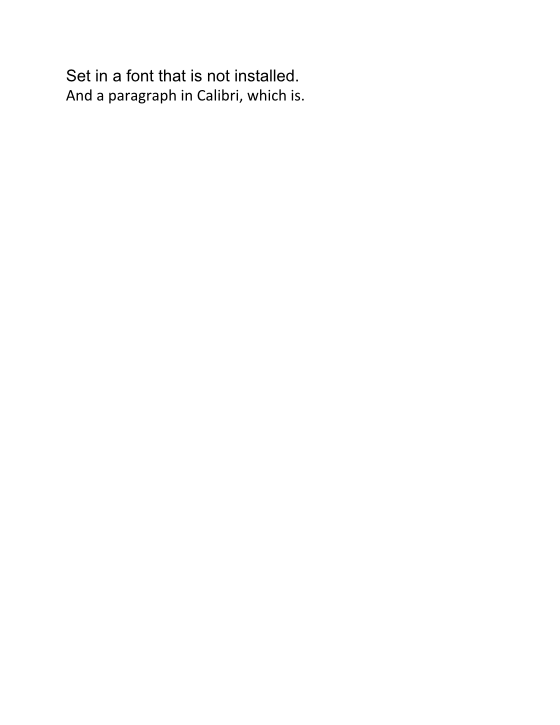
Substitution is silent unless you ask to hear about it:
| Setting | Effect |
|---|---|
WarnOnFontSubstitution = true |
Reports DXP3004, a summary of every substitution, to your diagnostics sink. |
FailOnFontSubstitution = true |
Throws FontResolutionException instead of substituting. |
FontFallbackChain |
Families to try, in order, for any missing family. |
ScriptFallbackFonts[script] |
Families to try for one script, such as Arabic or Han, ahead of the general chain. |
Important
Servers and containers: install the fonts your documents use. Substitutes are metric-compatible where possible, but only the real font guarantees the same line breaks as Word. Copy the font files into your image and add the folder to FontDirectories.
The font cache
Indexing the installed fonts takes about a second, so each DocWrightConverter caches its font engine, one per combination of font settings, up to eight. That is why an application should keep one converter. A host that changes fonts per tenant can call converter.ClearFontCache() to release the memory. It is safe while conversions are running, and it never changes the output.
Complex scripts
Arabic and Hebrew are shaped by the built-in engine: joining forms, ligatures such as lam-alef, and mark positioning. No setup is needed.
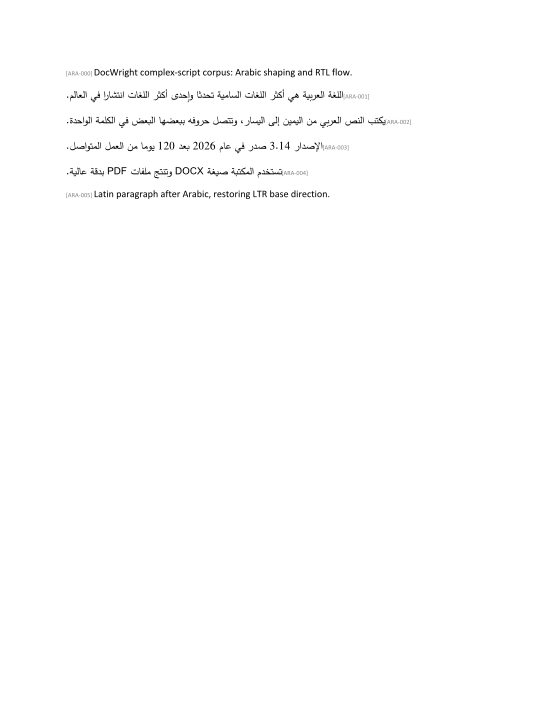
Indic scripts (Devanagari, Bengali, Tamil…), Thai, Khmer and other complex scripts need a shaper. Without one, each character is drawn on its own: vowel signs land in the wrong place and conjuncts don't form. Install DocWright.ComplexText and set the HarfBuzz shaper:
dotnet add package DocWright.ComplexText
using DocWright;
using DocWright.ComplexText;

var shaped = new ConvertOptions { TextShaper = new HarfBuzzTextShaper() };

using (FileStream input = File.OpenRead("hindi.docx"))
using (FileStream output = File.Create("hindi-harfbuzz.pdf"))
{
    converter.Convert(input, output, shaped);
}
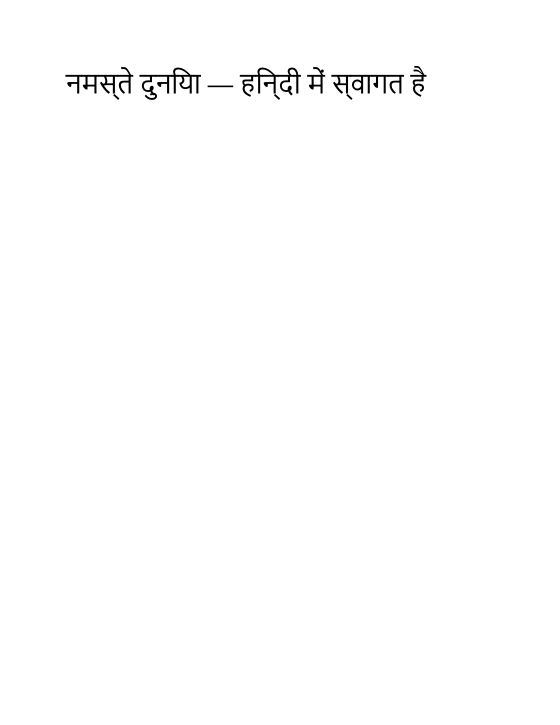 Built-in: the vowel sign in हिन्दी is misplaced
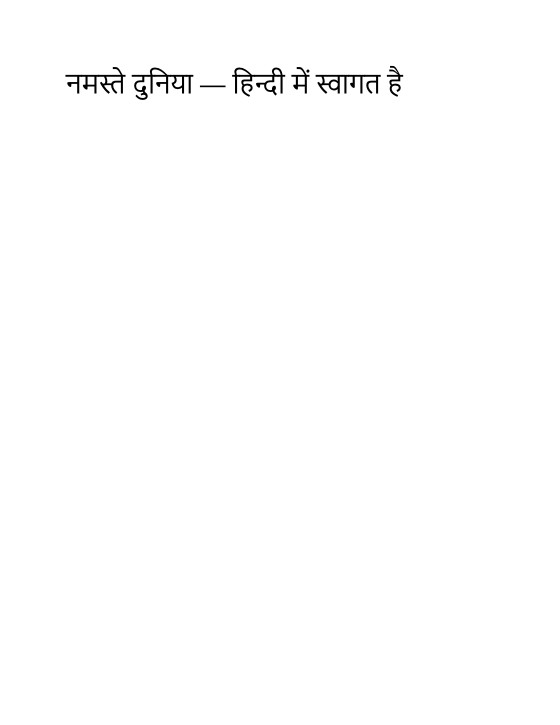 HarfBuzzTextShaper: correct
When the built-in engine can't shape a script it reports DXP2002, so you can detect documents that need the shaper.
Note
DocWright.ComplexText is the only DocWright package with a native dependency (HarfBuzzSharp). Windows and macOS binaries are included. On Linux, also add HarfBuzzSharp.NativeAssets.Linux to your application.
Symbol fonts
Symbol and Wingdings characters are stored as private-use code points. DocWright maps the Symbol and Dingbat sets to real Unicode in the PDF's text layer, so a Symbol bullet copies as "•" and a Greek alpha as "α". Wingdings, Webdings and private symbol fonts have no published mapping. Their characters render correctly but extract as private-use code points, reported once per font as DXP3006.