Forms and content controls
Word has two kinds of form control: modern content controls (Developer tab › Controls) and legacy form fields. DocWright reads and fills both. You don't need to render anything: load, fill and save.
See what a form contains
using DocWright;
using DocWright.Dom;
using DocWright.Dom.ContentControls;
using DocWright.Dom.Forms;

using FileStream input = File.OpenRead("forms.docx");
using WordDocument document = converter.Load(input);

// Content controls (Developer tab › Controls): body, headers, footers and notes.
foreach (ContentControl control in document.FindContentControls())
{
    Console.WriteLine($"control  {control.Kind,-14} tag={control.Tag ?? "-",-10} value={control.GetValue()}");
}

// Legacy form fields (the Word 97 ones).
foreach (FormField field in document.FindFormFields())
{
    Console.WriteLine($"field    {field.Kind,-14} name={field.Name ?? "-",-10} value={field.GetValue()}");
}
Output (this step, and the refusal further down)
control  PlainText      tag=name       value=Ada Lovelace
control  RichText       tag=summary    value=Rich text keeps its own run formatting.
control  CheckBox       tag=agreeYes   value=true
control  CheckBox       tag=agreeNo    value=false
control  DropDownList   tag=dept       value=ENG
control  ComboBox       tag=office     value=WLG
control  DatePicker     tag=signed     value=6 August 2026
control  BuildingBlockGallery tag=block      value=Quick part placeholder.
control  Group          tag=group      value=Grouped content is locked as a unit.
control  RepeatingSection tag=lines      value=First line item.
Second line item.
control  RepeatingSectionItem tag=-          value=First line item.
control  RepeatingSectionItem tag=-          value=Second line item.
control  PlainText      tag=signer     value=Grace Hopper
field    Text           name=FullName   value=Katherine Johnson
field    CheckBox       name=Agree      value=true
field    DropDown       name=Dept       value=Engineering
ContentControlEditException: 'Not an option' is not one of the drop-down list's entries, and a drop-down list accepts nothing else. Add the entry first, or use a combo box.
Fill it
using DocWright.Dom.ContentControls;
using DocWright.Dom.Forms;

foreach (ContentControl control in document.FindContentControls())
{
    switch (control.Kind)
    {
        case ContentControlKind.PlainText:
        case ContentControlKind.RichText:
            control.SetValue("Filled by DocWright");
            break;
        case ContentControlKind.CheckBox:
            control.SetValue("true");                    // also repaints the check glyph
            break;
        case ContentControlKind.DatePicker:
            control.SetDate(new DateTimeOffset(2026, 10, 1, 0, 0, 0, TimeSpan.Zero));
            break;
        case ContentControlKind.DropDownList:
        case ContentControlKind.ComboBox:
            control.SetValue(control.ListItems[^1].DisplayText);   // pick the last entry
            break;
    }
}

foreach (FormField field in document.FindFormFields())
{
    if (field.Kind == FormFieldKind.CheckBox)
    {
        field.IsChecked = true;
    }
    else if (field.Kind == FormFieldKind.Text)
    {
        field.SetValue("Katherine Johnson");               // truncated to the field's max length
    }
}
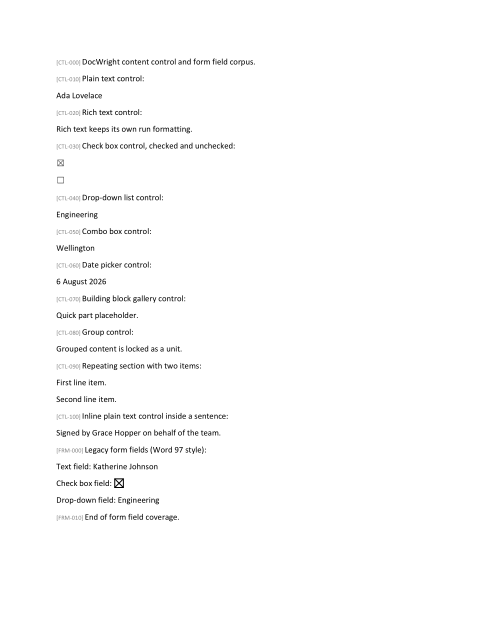 Before
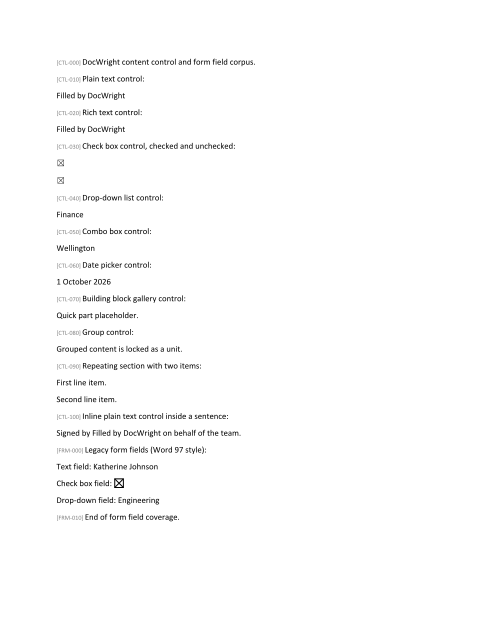 After
After| Content control kind | Set it with |
|---|---|
PlainText, RichText |
SetValue(text) |
CheckBox |
SetValue("true"), or IsChecked = true. The check glyph is repainted too. |
DropDownList |
SetValue(value or display text). It must be one of the entries. |
ComboBox |
SetValue(anything). Free text is allowed. |
DatePicker |
SetDate(DateTimeOffset, culture?). The control's date format is applied. |
RepeatingSection |
AddRepeatingItem(), MoveRepeatingItem(item, index), RemoveRepeatingItem(item) |
Find controls with FindContentControls(), FindContentControls(kind) or FindContentControlsByTag(tag). Tags are the reliable handle: set them in Word's control properties.
Invalid values are refused
A drop-down only accepts its own entries, as in Word. An edit DocWright can't make with certainty throws and changes nothing:
using DocWright.Dom.ContentControls;
using DocWright.Core;

// A drop-down only accepts one of its own entries, as in Word.
ContentControl? dropDown = document.FindContentControls(ContentControlKind.DropDownList).FirstOrDefault();
try
{
    dropDown?.SetValue("Not an option");
}
catch (DocWrightException ex)
{
    Console.WriteLine($"{ex.GetType().Name}: {ex.Message}");
}
Legacy form fields
FindFormFields() and FindFormField(name) return FormField objects. Set IsChecked on check boxes, SelectedIndex on drop-downs, and SetValue(text) on text fields. Text is cut to the field's maximum length. A check box shows CheckedState ?? IsCheckedByDefault: its stated state if there is one, otherwise its default.
Flatten before sending
To send a filled form to someone who shouldn't edit it, replace each field with what it shows:
using DocWright.Dom.Forms;

// For a recipient with no interactive fields: keep what is shown, drop the field.
foreach (FormField field in document.FindFormFields().ToList())
{
    field.Flatten();
}
Reading changes nothing
Reading a control's properties never modifies the document. A control you only inspect saves byte-for-byte, and properties DocWright doesn't model are preserved even when you edit others.
Protection is not security
document.Settings.Protection tells you what the author restricted, for example forms-only editing, and it is preserved on save, including the password hash. DocWright does not enforce it. Every editing API works on a protected document. Treat protection as the author's intent, not as a security control.
Custom XML data binding
A content control can be bound to a node in a custom XML part stored inside the document. Word treats the XML as the source of truth. CustomXmlDataStore.Open(document) gives you the parts:
| Call | Does |
|---|---|
store.RefreshBoundControls() |
Copies the XML values into the bound controls. |
store.SetBoundValue(control, value) |
Updates both the control and its XML node. |
store.ReadValue(binding), store.WriteValue(binding, value) |
Reads or writes the XML only. |
store.Flush() |
Writes changed parts back to the document before you save. |
Bindings use the XPath Word generates: absolute element paths with optional positions and an optional final attribute. Anything else throws ContentControlBindingException, naming the unsupported construct, instead of resolving the wrong node.