Tables of contents and updating fields
InsertTableOfContents builds Word's table of contents at a position, one entry per heading, as an undoable edit; UpdateFields is Word's F9 over a span: it rebuilds a table of contents from the headings as they are now and re-evaluates the other fields it meets.
The code
using DocWright.Dom.Editing;
using DocWright.Dom.Fields;
using DocWright.Layout;

// Word's table of contents at the top: levels 1-3, each entry a link to its heading.
DocumentEdit toc = document.InsertTableOfContents(DocumentPosition.StartOf(contents), new TableOfContentsOptions { MaxLevel = 3 });

// The page numbers: what the layout says each heading's bookmark is on (F9 over the table rebuilds it).
LayoutDocument layout = new LayoutSession(new FontEngine()).Layout(document);
var pages = new FieldUpdateOptions
{
    PageReference = name => layout.FindBookmarkPage(name) is int page ? layout.Pages[page - 1].Info?.PageNumberText : null,
};
DocumentEdit update = document.UpdateFields(new DocumentSpan(toc.After, toc.After), pages);

foreach (Paragraph entry in body.Blocks.OfType<Paragraph>().Where(p => p.Format?.StyleId?.StartsWith("TOC") == true))
{
    Console.WriteLine($"{entry.Format!.StyleId}: {string.Join(" ", entry.Inlines.OfType<TextRun>().Select(r => r.Text))}");
}
Output
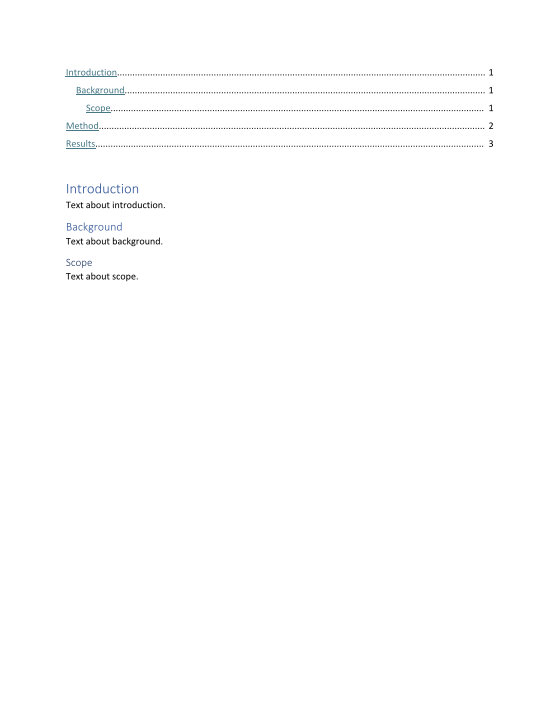
TOC1: Introduction 1
TOC2: Background 1
TOC3: Scope 1
TOC1: Method 2
TOC1: Results 3
How it works
- The structure is Word's. One TOC field (
TOC \o "1-3" \h \z \u) whose result is a paragraph per heading in styleTOC1toTOC9, with a right tab and dot leader at the text width, a link to a_Tocbookmark placed round the heading, and aPAGEREFfield to that bookmark. TheTOCnstyles are added as Word defines them when the document has none. - Headings are listed by Word's rules:
\otakes a paragraph by its style's outline level in the range,\uby its own outline level over its style's,\tby style name (see the options below). A paragraph mid-way through is split: the text before stays above the table, the text after follows it. - Page numbers. Layout draws every
PAGEREFfrom the page its bookmark lands on, so the pages shown are right as soon as the document is laid out. The cached results, which Word shows until it updates the field, are whatFieldUpdateOptions.PageReferencesays:LayoutDocument.FindBookmarkPagegives the page andLayoutPage.Info.PageNumberTextthe number it shows. - Updating.
UpdateFieldsover a span that meets the table rebuilds it, reusing the bookmarks still round their headings. Other fields it meets get their evaluated result (a DATE takes the clock in the options); PAGE and NUMPAGES stay with layout. Each call is oneDocumentEditwith exact undo. - No headings: the result is Word's "No table of contents entries found."
Word's Table of Contents options
TableOfContentsOptions carries the dialog's choices, written as Word writes them and read back by every update:
using DocWright.Core.Document;
using DocWright.Dom.Editing;

// Word's Table of Contents dialog: two levels, the Title listed too, no page numbers, no \u.
var options = new TableOfContentsOptions
{
    MaxLevel = 2,
    ShowPageNumbers = false,
    UseOutlineLevels = false,
    TabLeader = TabLeader.Hyphen,
};
options.AdditionalStyles.Add(new TableOfContentsStyle("Title", 1));
document.InsertTableOfContents(DocumentPosition.StartOf(contents), options);

string instruction = body.Blocks.OfType<Paragraph>().SelectMany(p => p.Inlines.OfType<FieldCode>())
    .First(c => c.Instruction.Contains("TOC")).Instruction;
Console.WriteLine($"Instruction:{instruction}");
foreach (Paragraph entry in body.Blocks.OfType<Paragraph>().Where(p => p.Format?.StyleId?.StartsWith("TOC") == true))
{
    Console.WriteLine($"{entry.Format!.StyleId}: {string.Concat(entry.Inlines.OfType<TextRun>().Select(r => r.Text))}");
}
Instruction: TOC \o "1-2" \n \h \z \t "Title,1"
TOC1: Annual report
TOC1: Introduction
TOC2: Background
| Option | Switch | Does |
|---|---|---|
ShowPageNumbers = false |
\n |
Entries end after their text; the tab stop stays. An instruction with \n "2-3" drops them for those levels only. |
RightAlignPageNumbers = false |
\p " " |
A space instead of the tab; \p "-" read from a document puts its text there. |
TabLeader |
none | The entries' tab leader: dots, hyphens, underscores or none. An update keeps the table's. |
UseHeadingStyles |
\o "1-3" |
Paragraphs by their style's outline level, in the range. |
UseOutlineLevels |
\u |
A paragraph's own outline level counts, over its style's. |
AdditionalStyles |
\t "Title,1" |
Other styles at the levels given. With \u, a paragraph of one is listed only if it has an outline level, and with \o too at that level unless its style is a heading (Word's behaviour, WQ-0110). |
Cross-references and bookmarks
Insert > Cross-reference and Insert > Bookmark are edits too. A reference to a heading or a note puts Word's hidden
_Ref bookmark round it (a second reference reuses it); UpdateFields recomputes every reference.
using DocWright.Core.Document;
using DocWright.Dom;
using DocWright.Dom.Editing;

// Insert > Bookmark, then Insert > Cross-reference to the heading, the bookmark and the footnote.
document.AddBookmark(new DocumentSpan(DocumentPosition.InParagraph(text, 4), DocumentPosition.InParagraph(text, 10)), "Budget");
Paragraph method = document.CrossReferenceHeadings()[0];
DocumentPosition at = DocumentPosition.EndOf(see);
at = document.InsertCrossReference(at, CrossReferenceTarget.Heading(method), CrossReferenceKind.Text).After;
at = document.InsertText(at, " (").After;
at = document.InsertCrossReference(at, CrossReferenceTarget.Heading(method), CrossReferenceKind.AboveBelow).After;
at = document.InsertText(at, "), the ").After;
at = document.InsertCrossReference(at, CrossReferenceTarget.Bookmark("Budget"), CrossReferenceKind.Text, hyperlink: false).After;
at = document.InsertText(at, " and note ").After;
NoteRef note = document.CrossReferenceNotes(NoteKind.Footnote)[0];
document.InsertCrossReference(at, CrossReferenceTarget.Note(note), CrossReferenceKind.NoteNumber);

Console.WriteLine(string.Concat(see.Inlines.OfType<TextRun>().Select(r => r.Text)));
foreach (FieldCode code in see.Inlines.OfType<FieldCode>())
{
    Console.WriteLine(code.Instruction.Trim());
}
See Method (above), the budget and note 1
REF _Ref100000000 \h
REF _Ref100000000 \p \h
REF Budget
NOTEREF _Ref100000001 \h
| Call | Does |
|---|---|
CrossReferenceHeadings(), CrossReferenceBookmarks(), CrossReferenceNotes(kind) |
What Word's dialog lists: paragraphs with an outline level, bookmarks not hidden, numbered note marks. |
InsertCrossReference(at, target, kind, hyperlink) |
REF (text), PAGEREF (page), REF \p (above/below), NOTEREF (\f formatted as the mark), \h for a link. |
AddBookmark(span, name), RemoveBookmark(at, name) |
A name starts with a letter and holds letters, digits and _, at most 40 (IsValidBookmarkName); adding an existing name moves it. |
Captions and a table of figures
References > Insert Caption and Insert Table of Figures: a caption is a paragraph in Word's Caption style with a SEQ
field for its number; captions of a label are numbered in document order, so one inserted before another moves it on.
using DocWright.Dom;
using DocWright.Dom.Editing;

document.InsertCaption(In(tables[1]), new CaptionOptions { Label = "Table", Title = ": Costs", Position = CaptionPosition.Above });

// Inserted before the other one: it becomes Table 1, and Costs moves on to Table 2.
document.InsertCaption(In(tables[0]), new CaptionOptions { Label = "Table", Title = ": Sales", Position = CaptionPosition.Above });

// A table of figures at the top, listing the Table captions.
document.InsertTableOfContents(DocumentPosition.StartOf(first), new TableOfContentsOptions { CaptionLabel = "Table" });

foreach (Paragraph paragraph in body.Blocks.OfType<Paragraph>())
{
    string style = paragraph.Format?.StyleId is { } id ? document.Styles.Find(id)?.Name ?? id : "Normal";
    string text = string.Concat(paragraph.Inlines.OfType<TextRun>().Select(r => r.Text)).Split('\t')[0];
    Console.WriteLine($"{style,-17} {text}");
}
table of figures  Table 1: Sales
table of figures  Table 2: Costs
Normal            Quarterly figures
caption           Table 1: Sales
Normal
Normal            Notes follow.
caption           Table 2: Costs
Normal
| Call | Does |
|---|---|
InsertCaption(at, options) |
Above (kept with the next paragraph) or below the table or paragraph at at: Label , SEQ Label \* ARABIC, the title. ExcludeLabel, NumberFormat (roman, letters); a label's spaces are underscores in SEQ. |
TableOfContentsOptions.CaptionLabel |
A table of figures: TOC \h \z \c "Label", entries in the Table of Figures style. |
UpdateField(at) |
Only the innermost field at the position; UpdateFields numbers every SEQ as Word's F9 does. |
An index
References > Mark Entry and Insert Index: an entry is an XE field after the marked text; the index is an INDEX field
in a continuous section of its own, its entries in Word's Index styles. The page numbers come from a layout of the
document: LayoutPositions.PageNumbers reads them from the glyph runs' source references.
using DocWright.Core.Rendering;
using DocWright.Dom;
using DocWright.Dom.Editing;
using DocWright.Dom.Fields;
using DocWright.Fonts;
using DocWright.Layout;

// References > Mark Entry: an XE field after the marked word.
document.MarkIndexEntry(After(0, "Apples"), new IndexEntryOptions("Apples"));
document.MarkIndexEntry(After(1, "Bananas"), new IndexEntryOptions("Fruit") { Subentry = "Bananas", BoldPageNumber = true });
document.MarkIndexEntry(After(2, "Cherries"), new IndexEntryOptions("Fruit") { Subentry = "Cherries" });
document.MarkIndexEntry(After(3, "Dates"), new IndexEntryOptions("Palms") { CrossReference = "See Dates" });
document.MarkIndexEntry(After(3, "apples"), new IndexEntryOptions("Apples"));

// The page each entry is on comes from a layout of the document (with source references, LayoutSession's default).
LayoutDocument layout = new LayoutSession(new FontEngine()).Layout(document);
var pages = new FieldUpdateOptions { PageNumberAt = LayoutPositions.PageNumbers(layout) };

// References > Insert Index: two columns, a letter before each group, in a continuous section of its own.
document.InsertIndex(DocumentPosition.EndOf(paragraphs[3]), new IndexOptions { Columns = 2, Headings = IndexHeadings.Letter }, pages);

foreach (Paragraph line in document.Sections[1].Blocks.OfType<Paragraph>())
{
    string style = line.Format?.StyleId is { } id ? document.Styles.Find(id)?.Name ?? id : "Normal";
    string text = string.Concat(line.Inlines.OfType<TextRun>().Select(r => r.Text));
    if (text.Length > 0)
    {
        Console.WriteLine($"{style,-14} {text}");
    }
}
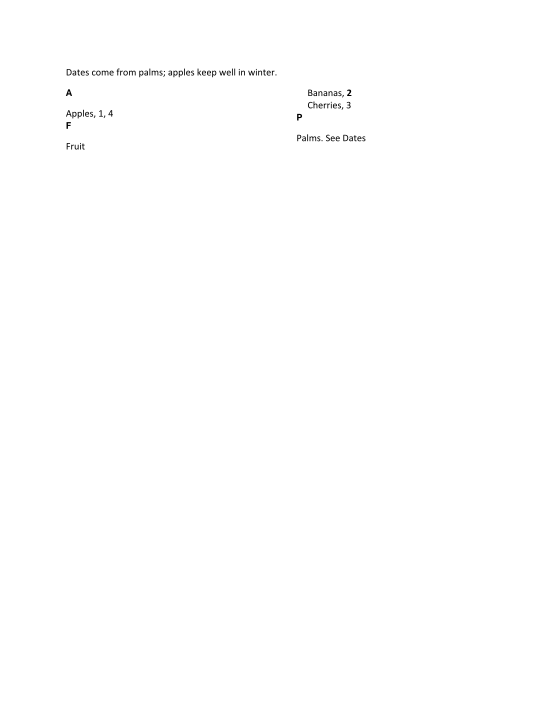
index heading  A
index 1        Apples, 1, 4
index heading  F
index 1        Fruit
index 2        Bananas, 2
index 2        Cherries, 3
index heading  P
index 1        Palms. See Dates
| Call | Does |
|---|---|
MarkIndexEntry(at, entry) |
XE "Main:Sub"; CrossReference (\t "See X") instead of a page, BoldPageNumber (\b), ItalicPageNumber (\i). A text has no quotes, colons or backslashes (IsValidEntry). |
InsertIndex(at, options, fieldOptions) |
Columns 1-4, Headings (none, a blank line, the letter), RightAlignPageNumbers (\e with a tab), TabLeader; sorted by FieldUpdateOptions.Culture. |
UpdateFields(span, options) |
Rebuilds the index from the XE fields as they are now. |
TableOfContentsOptions.UseEntryFields |
TOC \f: TC "text" \l n fields listed at their level beside the headings. |