Fill a template whose rows repeat for a list
A row holding {{#Lines}} is repeated once for each item of the list Lines, its {{Member}} placeholders filled from the item. The rows below move down, a total under the row covers every repeat, and every other {{placeholder}} is filled in the same call. It is the workbook counterpart of a Word template's {{#table}} row.
dotnet add package DocWright.Spreadsheet
Repeat a row for each line
using DocWright.Spreadsheet;

// A4 holds "{{#Lines}}{{Item}}": that row repeats once for each line.
XlsxTemplateResult result = book.FillTemplate(new Dictionary<string, object?>
{
    ["Number"] = "0042",
    ["Customer"] = "Northwind",
    ["Lines"] = new[]
    {
        new Dictionary<string, object?> { ["Item"] = "Consulting, days", ["Qty"] = 4, ["Price"] = 850m },
        new Dictionary<string, object?> { ["Item"] = "Workshop", ["Qty"] = 1, ["Price"] = 1200m },
        new Dictionary<string, object?> { ["Item"] = "Travel", ["Qty"] = 1, ["Price"] = 310.5m },
    },
});

foreach (XlsxFilledBlock block in result.Blocks)
{
    Console.WriteLine(block.Name + ": " + block.ItemCount + " items, rows " + block.FirstRow + " to " + (block.FirstRow + block.RowCount - 1));
}

Console.WriteLine("Row 6: " + sheet.GetCell("A6").DisplayText + ", " + sheet.GetCell("D6").Formula);
Console.WriteLine("The total: " + sheet.GetCell("D7").Formula);
Lines: 3 items, rows 4 to 6
Row 6: Travel, B6*C6
The total: SUM(D4:D6)
Ink: SUM(D4:D5)
Refused (data); the message names the fix: True
1: Order 1
2: Pen  3
3: Ink  1
4: Items in order 1  SUM(B2:B3)
5: Order 2
6: Pad  5
7: Items in order 2  SUM(B6:B6)
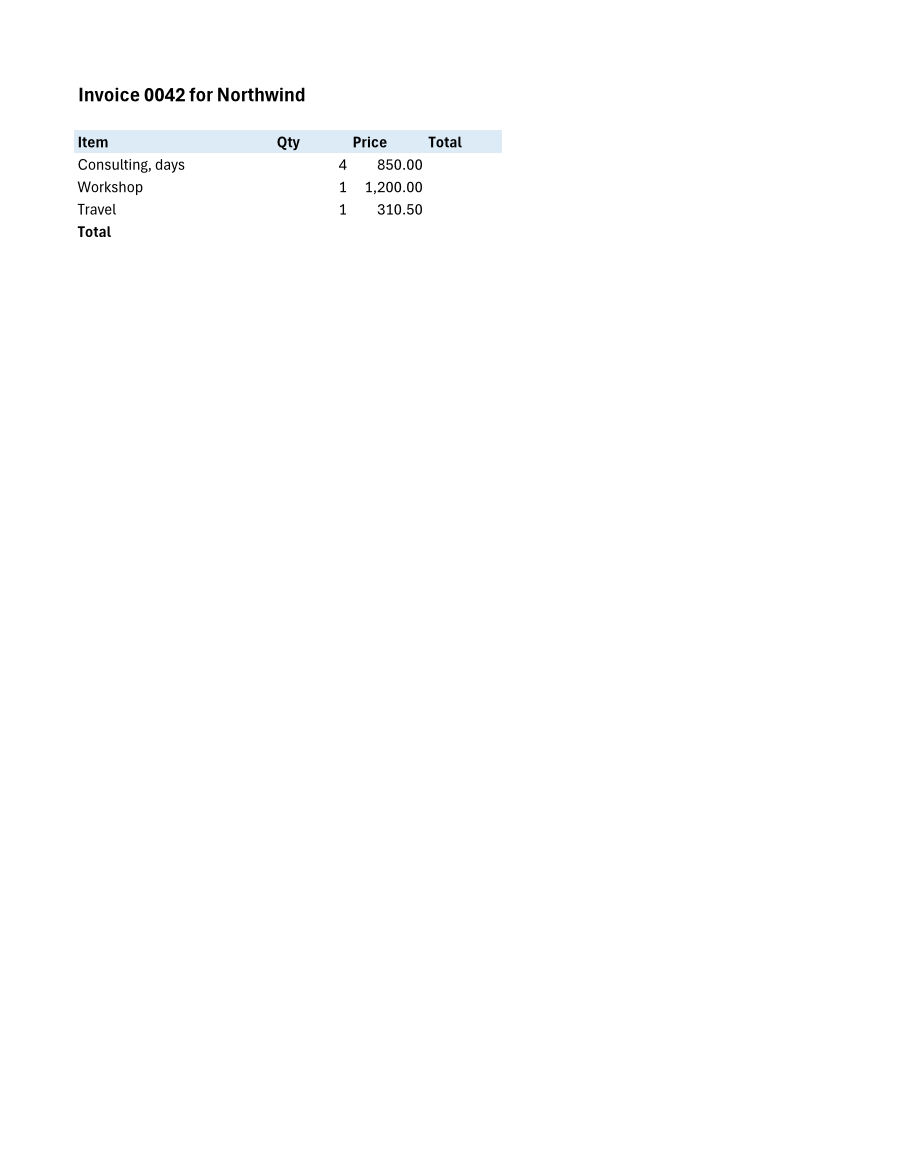
=B4*C4 ... =SUM(D4:D6)): DocWright writes them and does not calculate them, so this picture, drawn by DocWright, shows them empty; Excel calculates them when it opens the file. Download: invoice-filled.xlsx.{{#Lines}} can go in any cell of the row, and is taken out. A cell that held only a marker is left empty, with its format. The template here is made in code so the sample stands alone; a real one is a workbook somebody designed in Excel, opened with XlsxDocument.Open.
| Each repeat | The row's cells, their formats, the row's height and the merges inside it. A relative reference moves with its row (=B4*C4 becomes =B5*C5); an absolute one does not move. |
| Below the block | The rows move down, and everything that pointed at them follows, as with inserted rows. |
| What grows | A range from the block's first row or above down to its last row covers every repeat: the total, a sum on another sheet, a defined name, a chart's series, a table, a filter, a conditional format, a validation. |
| Members | {{Item}} or {{Lines.Item}}, matched without regard to case. A name the item does not have is looked for in the outer item, then in the data. A placeholder that is the whole cell takes its value's type, so {{Qty}} is a number the formula multiplies. |
| Several rows | Put {{/Lines}} in a row below: the block is every row from one marker to the other. |
| Empty list | Its rows are removed (EmptyList = XlsxEmptyList.RemoveRows, the default), or kept once with their placeholders emptied (KeepRows). |
| Missing list | The block is left exactly as it stands, and the name is in UnresolvedNames. Placeholders.Unresolved = Throw makes it a DXP1004 error. |
Note
Checked against Excel. Templates written by Excel were filled here and read back by Excel, which opens them without repair and agrees on every cell, format, height, merge, conditional format, validation and table. The same row copied and inserted three times by hand in Excel gives the same copies, with one deliberate difference: Excel leaves =SUM(D6:D6) under the block, a sum on another sheet and a table as they were, because an insert at the edge of a range does not grow it. A template's total is meant to cover its lines, so here it does. InsertRows on its own keeps Excel's rule.
Lists of your own objects
using DocWright.Spreadsheet;

// Objects of your own type, anonymous ones too, go through XlsxTemplateList.From.
var lines = new[]
{
    new { Item = "Pen", Qty = 3, Price = 1.2m },
    new { Item = "Ink", Qty = 1, Price = 4m },
};

XlsxDocument second = InvoiceTemplate();
second.FillTemplate(new Dictionary<string, object?>
{
    ["Number"] = "0043",
    ["Customer"] = "Contoso",
    ["Lines"] = XlsxTemplateList.From(lines),
});
Console.WriteLine(second.Sheets[0].GetCell("A5").DisplayText + ": " + second.Sheets[0].GetCell("D6").Formula);

// Given bare, a list of objects is refused, with the fix in the message.
try
{
    InvoiceTemplate().FillTemplate(new Dictionary<string, object?> { ["Lines"] = lines });
}
catch (ArgumentException refused)
{
    Console.WriteLine("Refused (" + refused.ParamName + "); the message names the fix: " + refused.Message.Contains("XlsxTemplateList.From(items)"));
}
A list can be a DataTable, a DataView, a sequence of dictionaries or DataRows, or plain values (a plain value answers to its list's name: {{#Tags}}{{Tags}}). Objects of your own type go through XlsxTemplateList.From, which reads the type's public properties. Because the type is known when your application is compiled, a trimmed or NativeAOT application reads the same members.
An order and its lines
using DocWright.Spreadsheet;

// An order and its lines: a block inside a block, closed with {{/Name}}.
XlsxDocument orders = XlsxDocument.Create();
XlsxDocumentSheet o = orders.Sheets[0];
o.SetValue("A1", XlsxCellValue.Text("{{#Orders}}Order {{Id}}"));
o.SetValue("A2", XlsxCellValue.Text("{{#Lines}}{{Item}}"));
o.SetValue("B2", XlsxCellValue.Text("{{Qty}}"));
o.SetValue("C2", XlsxCellValue.Text("{{/Lines}}"));
o.SetValue("A3", XlsxCellValue.Text("Items in order {{Id}}"));
o.SetFormula("B3", "SUM(B2:B2)");
o.SetValue("C3", XlsxCellValue.Text("{{/Orders}}"));

orders.FillTemplate(new Dictionary<string, object?>
{
    ["Orders"] = new[]
    {
        new Dictionary<string, object?>
        {
            ["Id"] = 1,
            ["Lines"] = new[] { new Dictionary<string, object?> { ["Item"] = "Pen", ["Qty"] = 3 }, new Dictionary<string, object?> { ["Item"] = "Ink", ["Qty"] = 1 } },
        },
        new Dictionary<string, object?>
        {
            ["Id"] = 2,
            ["Lines"] = new[] { new Dictionary<string, object?> { ["Item"] = "Pad", ["Qty"] = 5 } },
        },
    },
});

for (int row = 1; row <= 7; row++)
{
    Console.WriteLine(row + ": " + o.GetCell(row, 1).DisplayText + "  " + (o.GetCell(row, 2).Formula ?? o.GetCell(row, 2).DisplayText));
}
A block inside a block repeats, for each outer item, once for each item of the outer item's member of that name. A range in the outer block over the inner block's rows covers that order's own lines. One level of nesting only: a third is refused. NestedLists = false makes inner markers ordinary placeholders.
Important
An order with no lines loses its line rows, and a subtotal over them has no rows left: it becomes =SUM(#REF!), which is what Excel does to a range whose every row is deleted. Set EmptyList = XlsxEmptyList.KeepRows to keep one empty line instead.
Limits and refusals
XlsxTemplateOptions.MaxCells |
10,000,000 by default. Counts the cells the blocks write and, for each block, the cells of its sheet, which the block reads and moves, before anything changes: ResourceLimitExceededException. |
| A list longer than the rows left below its block | InvalidOperationException, before anything changes. |
| Markers that do not pair up, blocks nested two deep, two blocks on one row | InvalidDocumentException, before anything changes. |
A list of objects given without XlsxTemplateList.From, or a block whose value is not a list |
ArgumentException, with ParamName data. |
100,000 lines of a seven-cell row fill in about a second. Nothing is calculated: the saved workbook asks Excel to calculate when it opens.
Not supported
Repeating columns across for each item, a picture or a chart for each item, and blocks shown or hidden by a condition.