Embed the viewer
The viewer is one component, ReportViewer, with a backend behind it. In Blazor Server the backend runs the engine in your process; in WebAssembly it talks to the host's REST API and the engine runs in the browser. The page is the same either way.
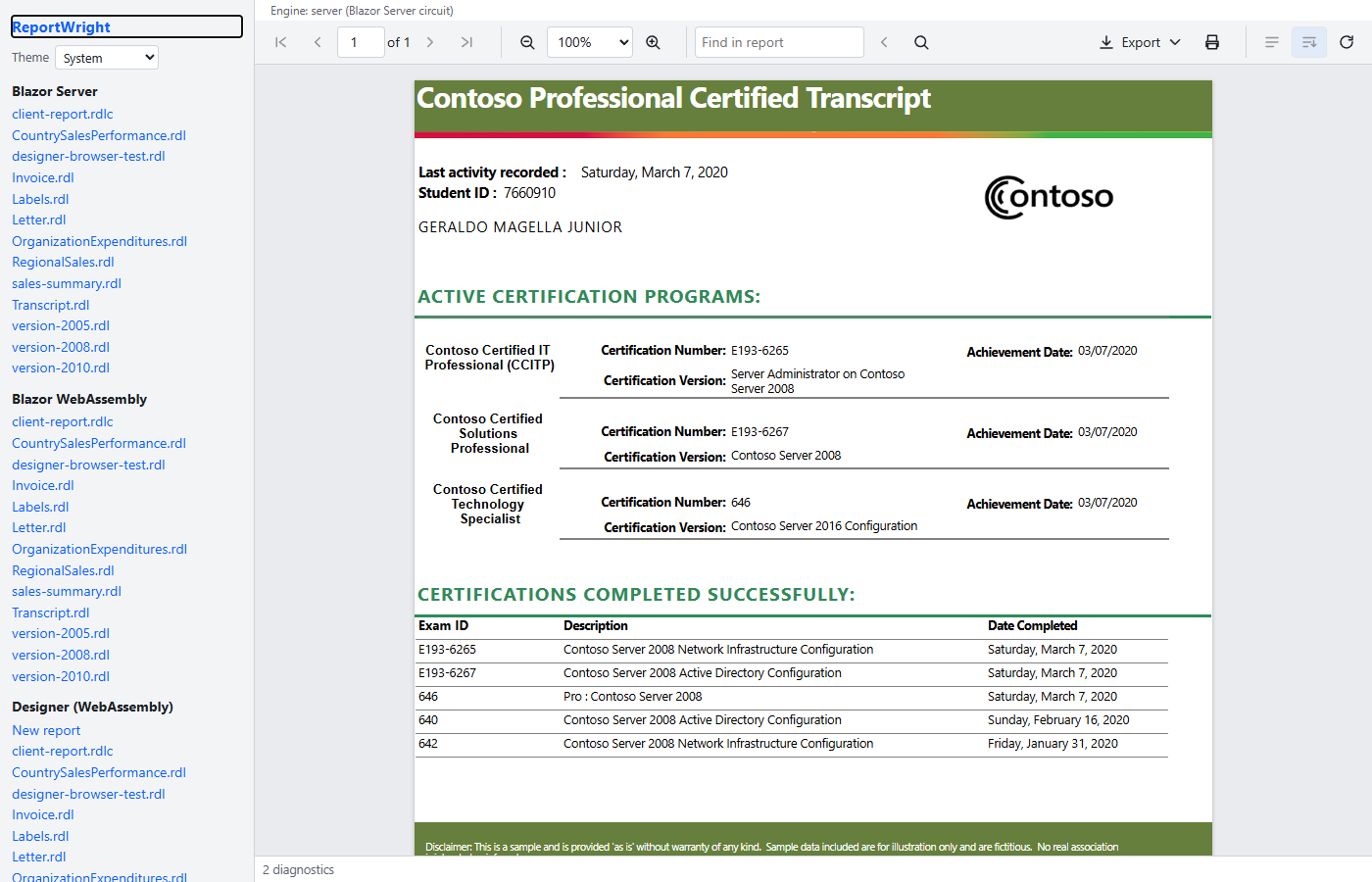
1. Blazor Server, local backend
Register a ReportViewerBackend as a singleton. LocalReportViewerBackend takes a font engine, a delegate that reads a report by path, and the data provider the engine calls for dataset rows — here a DataSourceRouter that resolves the report's Files data source to a folder of CSV files.
using DocWright.Fonts;
using DocWright.Reporting.Rdl;
using ReportWright.Blazor;
using ReportWright.Data;
using ReportWright.Data.Csv;

var resolver = new StaticDataSourceResolver()
    .Add("Files", new ResolvedDataSource(CsvDataSourceProvider.ProviderKind, "Files") { ConnectionString = dataDirectory });
var router = new DataSourceRouter(resolver, new DataSourceRegistry().Add(new CsvDataSourceProvider()));

builder.Services.AddSingleton<ReportViewerBackend>(new LocalReportViewerBackend(
    new FontEngine(),
    (path, _) =>
    {
        using FileStream stream = File.OpenRead(Path.Combine(reportsDirectory, Path.GetFileName(path)));
        return Task.FromResult(new RdlReader().Read(stream));
    },
    router));
Then the page:
@page "/viewer/{*Path}"
@using ReportWright.Blazor.Viewer

<ReportViewer Path="@Path" />

@code {
    [Parameter] public string? Path { get; set; }
}
That is the whole of the ReportWright.Samples.Embed sample's viewer page. The component takes its backend from dependency injection when the Backend parameter is not set, runs the report on load (AutoRun), and shows the toolbar: first, previous, next and last page, a page box, zoom presets and fit modes, parameters, refresh, search, document map, export and print.
2. Blazor Server over the host, one call
When the application already hosts ReportWright (a store, permissions, providers), ReportWright.Blazor.Server joins the host and the components in one call, instead of AddReportWright:
using ReportWright.AspNetCore;
using ReportWright.Blazor.Server;
using ReportWright.Data.Csv;

builder.Services.AddSingleton<ReportStore>(new FileSystemReportStore(reportsDirectory));
builder.Services.AddSingleton<ReportPermissions>(new MyPermissions());
builder.Services.AddReportWrightComponents(options => options.Providers.Add(new CsvDataSourceProvider()));
It registers a viewer backend and a designer backend per circuit. Both run the engine in your process through the host's runner and ask ReportPermissions about the signed-in user (from the registered AuthenticationStateProvider) before every load, export, save and schema question; a refusal shows in the component as an error. The same page as above works unchanged, and so does <ReportDesigner>.
3. WebAssembly, REST backend
In the server project map the API and register the stores and providers:
builder.Services.AddSingleton<ReportStore>(new FileSystemReportStore(reportsDirectory));
builder.Services.AddSingleton<DataSourceResolver>(myResolver);
builder.Services.AddReportWright(options => options.Providers.Add(new CsvDataSourceProvider()));
// …
app.MapReportWright("/reporting");
In the client project register HttpReportViewerBackend over an HttpClient whose base address is the host, and use the same page. The engine runs in the browser with the bundled fonts; the host serves definitions and dataset rows, never a query or a connection string.
Parameters from the host
Parameters supplies values the page already knows (a tenant, a date range); HideSuppliedParameters keeps them out of the parameter bar. The report's own ReportParametersLayout grid, when it has one, lays the bar out; otherwise the prompts flow in document order.
<ReportViewer Path="sales.rdl"
              Parameters="@(new Dictionary<string, ReportParameterValue> { ["Region"] = new ReportParameterValue("North") })"
              HideSuppliedParameters="true" />
Hyperlinks, themes, strings
OnHyperlink receives a report hyperlink's target so the host decides what to open; drillthrough stays inside the viewer with a back stack. Theme is light, dark or high-contrast (or null to follow the system); every colour is a CSS custom property on the component's root. Strings takes a ReportViewerStrings subclass for another language.