Insert and format shapes
InsertShape inserts a shape as Word's Insert > Shapes does, and SetShapeFill, SetShapeOutline, ResizeShape, SetShapeRotation, SetShapeGeometry and SetShapeLayout change it as the Shape Format tab does: one undoable DocumentEdit each.
Insert a shape
using DocWright.Core.Primitives;
using DocWright.Dom;
using DocWright.Dom.Editing;

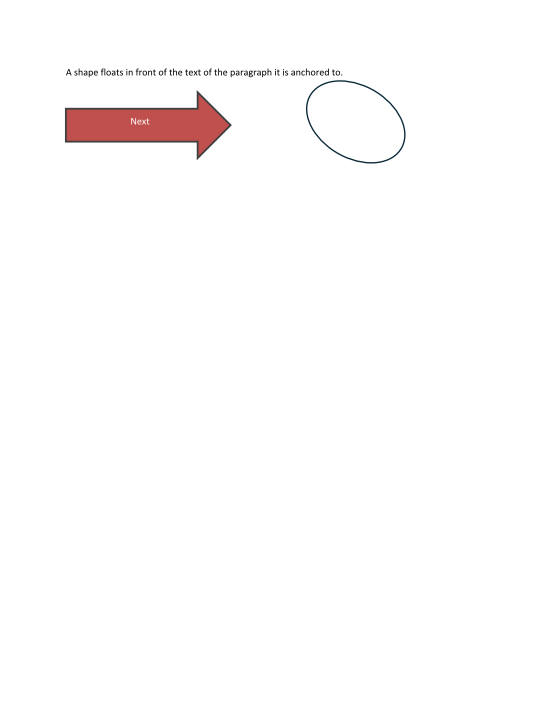
// Word's Insert > Shapes: a right arrow, 2 x 0.8 in, floating in front of text, in the theme's colours.
ImageAnchor anchor = ImageEditingExtensions.NewFloatingAnchor();
anchor.VerticalOffset = Emu.FromInches(0.4);
DocumentEdit insert = document.InsertShape(DocumentPosition.StartOf(first), "rightArrow", Emu.FromInches(2), Emu.FromInches(0.8), anchor);
ShapeRef arrow = first.Inlines.OfType<ShapeRef>().Single();

// It has an empty centred paragraph in its text body: type into it as into any paragraph.
Paragraph label = ((GeometryShape)arrow.Root!).TextBody!.Blocks.OfType<Paragraph>().Single();
document.InsertText(DocumentPosition.StartOf(label), "Next");
Console.WriteLine($"{((GeometryShape)arrow.Root!).Geometry!.Preset}, {arrow.Width.Value} x {arrow.Height.Value} EMU, {arrow.Placement}");
The preset is one of ShapePresets.Names, the 187 shapes of the format ("rect", "ellipse", "rightArrow", "star5", …); any other name is an ArgumentException. The new shape is the one Word inserts: floating in front of text at the anchor (ImageEditingExtensions.NewFloatingAnchor() when you pass none), the theme's first accent colour as its fill with a darker shade as its line, and an empty centred paragraph in its text body.
Format it
using DocWright.Core.Primitives;
using DocWright.Dom;
using DocWright.Dom.Editing;

// The Shape Format tab: fill, outline, size, rotation and Change Shape, one undoable edit each.
document.SetShapeFill(arrow, ColorRgb.FromRgb(0xC0, 0x50, 0x4D));
document.SetShapeOutline(arrow, ColorRgb.FromRgb(0x40, 0x40, 0x40), Emu.FromPoints(2));
document.ResizeShape(arrow, Emu.FromInches(2.5), Emu.FromInches(1));

// A second shape, then changed to an oval and turned; No Fill leaves its outline.
ImageAnchor right = ImageEditingExtensions.NewFloatingAnchor();
right.HorizontalOffset = Emu.FromInches(3.6);
right.VerticalOffset = Emu.FromInches(0.3);
document.InsertShape(DocumentPosition.StartOf(first), "rect", Emu.FromInches(1.6), Emu.FromInches(1.1), right);
ShapeRef box = first.Inlines.OfType<ShapeRef>().First();
document.SetShapeGeometry(box, "ellipse");
document.SetShapeFill(box, null);
DocumentEdit turn = document.SetShapeRotation(box, 30 * 60000, flipHorizontal: false, flipVertical: false);
Console.WriteLine($"{((GeometryShape)box.Root!).Geometry!.Preset}, fill {((GeometryShape)box.Root!).Fill!.Kind}");
Console.WriteLine($"presets: {ShapePresets.Names.Count}, \"star5\" is one: {ShapePresets.IsDefined("star5")}");
Output
rightArrow, 1828800 x 731520 EMU, Anchored
ellipse, fill None
presets: 187, "star5" is one: True
| Call | Word | Notes |
|---|---|---|
SetShapeFill(shape, color) |
Shape Fill | null is No Fill |
SetShapeOutline(shape, color, width) |
Shape Outline, Weight | null colour is No Outline; a null width keeps the line's own; dash, join and arrow heads stay |
ResizeShape(shape, width, height) |
Size | each side above zero and at most 22 in |
SetShapeRotation(shape, rotation, flipH, flipV) |
Rotate | 60000ths of a degree, clockwise; values are written as stated |
SetShapeGeometry(shape, preset) |
Change Shape | the preset's own adjust values |
SetShapeLayout(shape, anchor) |
Layout Options | wrap and position, as for a picture; null puts it in line |
A value the shape already has gives an empty edit. These edit a single shape: a group, a drawing canvas or an old VML shape is refused with InvalidOperationException.
Draw lines and arrows
using DocWright.Core.Primitives;
using DocWright.Dom;
using DocWright.Dom.Editing;

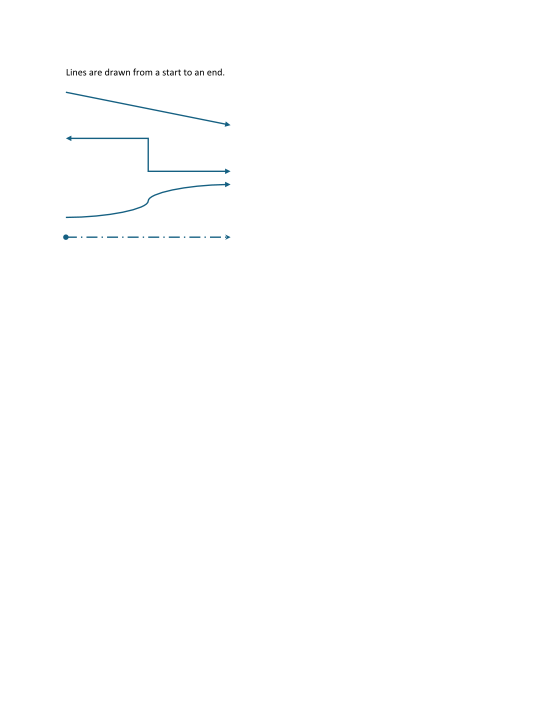
// Word's Insert > Shapes > Lines: each is drawn from its start to its end. The box spans the two; the flips say
// which corner the line starts at.
ImageAnchor At(double inchesDown)
{
    ImageAnchor anchor = ImageEditingExtensions.NewFloatingAnchor();
    anchor.VerticalOffset = Emu.FromInches(inchesDown);
    return anchor;
}

DocumentPosition start = DocumentPosition.StartOf(first);
document.InsertLine(start, ShapeLineKind.Arrow, Emu.FromInches(2.5), Emu.FromInches(0.5), false, false, At(0.4));
document.InsertLine(start, ShapeLineKind.ElbowDoubleArrow, Emu.FromInches(2.5), Emu.FromInches(0.5), false, false, At(1.1));
DocumentEdit curve = document.InsertLine(start, ShapeLineKind.CurvedArrow, Emu.FromInches(2.5), Emu.FromInches(0.5), false, true, At(1.8));

// Shape Outline > Arrows and Dashes on a fourth, plain line.
document.InsertLine(start, ShapeLineKind.Line, Emu.FromInches(2.5), Emu.FromInches(0), false, false, At(2.6));
ShapeRef plain = first.Inlines.OfType<ShapeRef>().First();
document.SetShapeLineEnds(plain, ShapeLineEndKind.Oval, ShapeLineEndKind.Stealth);
document.SetShapeDash(plain, ShapeDash.LongDashDot);

foreach (ShapeRef line in first.Inlines.OfType<ShapeRef>())
{
    var shape = (GeometryShape)line.Root!;
    Console.WriteLine($"{line.Name}: {shape.Geometry!.Preset}, ends {shape.Stroke?.HeadEnd?.Kind.ToString() ?? "-"}/{shape.Stroke?.TailEnd?.Kind.ToString() ?? "-"}, dash {shape.Stroke?.DashStyle ?? "-"}");
}
Output
Straight Connector 4: line, ends Oval/Stealth, dash lgDashDot
Connector: Curved 3: curvedConnector3, ends -/Triangle, dash -
Connector: Elbow 2: bentConnector3, ends Triangle/Triangle, dash -
Straight Arrow Connector 1: straightConnector1, ends -/Triangle, dash -
| Call | Word | Notes |
|---|---|---|
InsertLine(at, kind, width, height, flipH, flipV) |
Insert > Shapes > Lines | ShapeLineKind: Line, Arrow, DoubleArrow, Elbow, ElbowArrow, ElbowDoubleArrow, Curved, CurvedArrow, CurvedDoubleArrow; the box spans the start and the end; a line with no length is refused |
SetShapeLineEnds(shape, head, tail) |
Shape Outline > Arrows | ShapeLineEndKind: None, Triangle, Stealth, Diamond, Oval, Arrow |
SetShapeDash(shape, dash) |
Shape Outline > Dashes | ShapeDash; Round Dot and Square Dot are dots with a round or square cap, as Word writes them |
A line is saved as Word's gallery draws it, and drawn as Word draws it: a line in Word's theme style is 1.5 pt even in a document with no theme part, and its arrowheads, dashes and caps are Word's.
Group shapes
using DocWright.Core.Primitives;
using DocWright.Dom;
using DocWright.Dom.Editing;

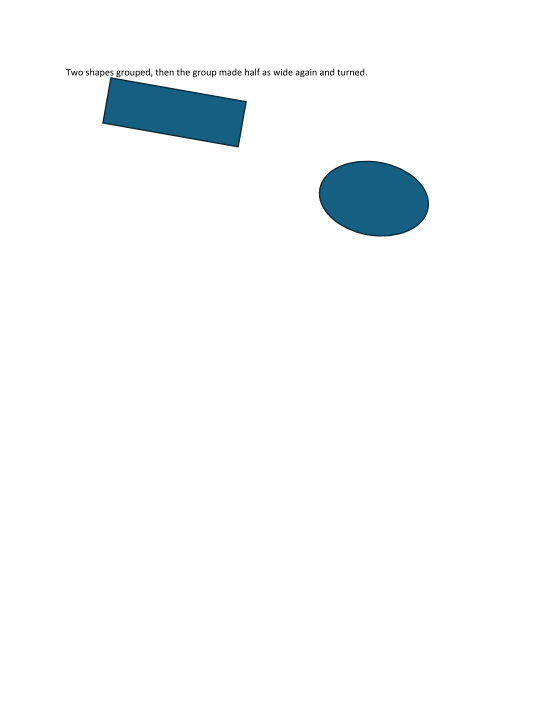
// Word's Arrange > Group: each shape with where its box is (here the paragraph's own space, where both are
// anchored), the group anchored at the paragraph at its top edge, at its offsets there.
document.GroupShapes(
    new[]
    {
        new PlacedShape(rectangle, Emu.FromPoints(36), Emu.FromPoints(44)),
        new PlacedShape(oval, Emu.FromPoints(200), Emu.FromPoints(84)),
    },
    first,
    Emu.FromPoints(36),
    Emu.FromPoints(44));
ShapeRef group = first.Inlines.OfType<ShapeRef>().Single();
Console.WriteLine($"{group.Name}: {((ShapeGroup)group.Root!).Children.Count} shapes, {group.Width.Value} x {group.Height.Value} EMU");

// It moves, resizes and turns as one shape; its shapes scale with it.
document.ResizeShape(group, new Emu(group.Width.Value * 3 / 2), group.Height);
DocumentEdit turn = document.SetShapeRotation(group, 10 * 60000, flipHorizontal: false, flipVertical: false);
Console.WriteLine($"resized to {group.Width.Value} EMU wide, turned {((ShapeGroup)group.Root!).Transform!.Rotation / 60000} degrees");
Output
Group 3: 2 shapes, 3098800 x 1524000 EMU
resized to 4648200 EMU wide, turned 10 degrees
| Call | Word | Notes |
|---|---|---|
GroupShapes(shapes, target, horizontalOffset, verticalOffset) |
Arrange > Group | PlacedShape: each shape with where its box is; two floating shapes or more; the group is In Front of Text, anchored at target (Word's: the paragraph at its top edge) |
UngroupShape(group) |
Arrange > Ungroup | each shape where the group drew it, with the group's wrap |
SetShapeLayout, ResizeShape, SetShapeRotation |
Wrap, Size, Rotate | take a group as they take one shape; its shapes scale with it |
What is saved
Word saves every shape twice, as a DrawingML shape and as a VML copy for older readers. A shape you change is saved as the DrawingML shape alone, with the change in it; Word opens it as its own and writes the second copy again the next time it saves. A shape whose text alone you changed keeps both copies, with the new text in each (Text in text boxes and shapes).
Text in a turned shape
A turned or flipped shape's text is drawn as Word draws it: laid out in the shape's own text box and turned with the shape about the box's centre. A horizontal flip leaves the text as it is and a vertical flip turns it a half turn; Word never mirrors text. ShapeTextBody.Upright (Word's Do not rotate text) keeps it upright in the box turned by the nearest quarter turn, and ShapeTextBody.Rotation turns the text on its own. In a laid-out page the text sits between a TurnScope push and pop, in its upright frame; both built-in renderers draw it turned, and the PDF keeps it as text.
Vertical text (ShapeTextBody rotated a quarter turn, Word's Text direction) is stacked on Word's taller turned line box, as in a vertical table cell: the upright line plus 1/32 of the em before the line-spacing rule; an exact rule is kept as stated. A hyperlink's clickable area in turned text stays where the text would be upright, as in Word's PDF.