Styles and formatting
Formatting in a Word document comes from styles, named sets of formatting in the document's style table, plus optional direct formatting on individual paragraphs and runs. DocWright models both exactly as Word does.
Define and apply a style
using DocWright.Core.Document;
using DocWright.Core.Primitives;
using DocWright.Dom;
using DocWright.Dom.Editing;

using var document = new WordDocument();
Section section = document.AppendSection();

// A paragraph style: a real Word style that shows in Word's Styles pane.
var heading = new Style("SectionHeading", StyleType.Paragraph)
{
    Name = "Section Heading",
    QuickFormat = true,
    CharacterFormat = new CharacterFormat
    {
        Bold = true,
        FontSize = Twips.FromPoints(16),
        Color = new DocColor(ColorRgb.FromRgb(0x1E, 0x3A, 0x8A)),
    },
    ParagraphFormat = new ParagraphFormat
    {
        SpacingBefore = Twips.FromPoints(18),
        SpacingAfter = Twips.FromPoints(6),
        KeepNext = true,
        OutlineLevel = 0,        // appears in the navigation pane and as H1 in tagged PDF
    },
};
document.Styles.Add(heading);

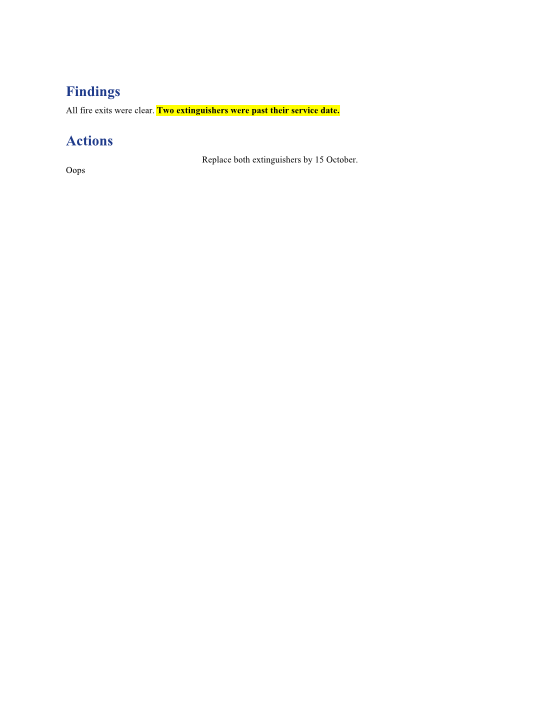
section.AppendParagraph("Findings").ApplyStyle("SectionHeading");
Paragraph body = section.AppendParagraph("All fire exits were clear. ");

// Direct formatting on top of the style, for one run only.
body.AppendText("Two extinguishers were past their service date.",
    new CharacterFormat { Bold = true, Highlight = HighlightColor.Yellow });

section.AppendParagraph("Actions").ApplyStyle("SectionHeading");
section.AppendParagraph("Replace both extinguishers by 15 October.")
       .ApplyFormatting(new ParagraphFormat { Alignment = ParagraphAlignment.Center });
| Call | Does |
|---|---|
document.Styles.Add(style) |
Adds a style to the document's style table. |
paragraph.ApplyStyle(id) / run.ApplyStyle(id) |
References a paragraph or character style by its id. |
paragraph.ApplyFormatting(ParagraphFormat) |
Adds direct paragraph formatting. Only the properties you set are changed; the rest keep inheriting. |
run.ApplyFormatting(CharacterFormat) |
The same for a run of text. |
range.ApplyFormatting(...), range.ApplyStyle(id) |
The same for every paragraph or run in a DocumentRange. |
Styles are checked
ApplyStyle throws InvalidDocumentException (code DXP1002) when the style doesn't exist, or is the wrong kind:
using DocWright.Core;
using DocWright.Dom.Editing;

try
{
    section.AppendParagraph("Oops").ApplyStyle("Heading9");   // not in this document
}
catch (InvalidDocumentException ex)
{
    Console.WriteLine(ex.Message);
}
Output
DXP1002: the document defines no style with id 'Heading9'; applying it would leave a dangling reference that resolves to nothing.
A reference to a style that doesn't exist would be silently ignored at render time, so the formatting you asked for would never appear. Failing early is kinder.
The formatting model
Every property on CharacterFormat and ParagraphFormat is nullable. null means "inherit": from the paragraph's style, its base style, and finally the document defaults. This matches how Word stores formatting, and it's why saving a document writes back only what was really set.
Common CharacterFormat properties |
Common ParagraphFormat properties |
|---|---|
Bold, Italic, Underline, Strike |
Alignment |
FontSize (Twips), FontAscii (the font name) |
SpacingBefore, SpacingAfter, LineSpacing |
Color (DocColor), Highlight, Shading |
IndentLeft, IndentRight, IndentFirstLine, IndentHanging |
Caps, SmallCaps, Vanish (hidden) |
KeepNext, KeepLines, PageBreakBefore, WidowControl |
CharacterSpacing, Kerning, Position |
OutlineLevel, Borders, Tabs |
Lists
paragraph.AppendToList(numberingId, level) puts a paragraph into an existing list definition from document.Numbering. It references the list rather than copying it, so numbering continues instead of restarting. To create new lists from code, Composition's List(...) writes the numbering definition for you.