Tutorial: Build a report in code
Build a two-page quarterly sales report entirely in C#, with no template, using the fluent DocWright.Composition API. The result is a real Word document: render it to PDF, or save it as a .docx someone can keep editing in Word.
You will learn to:
- set up pages, margins, headers and footers with "Page X of Y"
- define named styles that become real Word styles
- lay out blocks with
Column,Row,TableandList - drive the layout from your own data with ordinary loops and conditions
Before you start
dotnet add package DocWright.Composition
Step 1: Your data
A composition is plain C#, so the data can be anything. This tutorial uses one record per sales region:
public sealed record RegionSales(string Region, int Orders, decimal Revenue, decimal Target)
{
    public decimal Attainment => this.Revenue / this.Target;
}
Step 2: Compose the report
using DocWright.Composition;
using DocWright.Core.Primitives;

var brand = ColorRgb.Parse("1E3A8A");
var muted = ColorRgb.Parse("64748B");
var rule = ColorRgb.Parse("CBD5E1");
var tint = ColorRgb.Parse("EEF2FF");

ComposedDocument report = ComposedDocument.Create(document =>
{
    // Named styles become real Word styles in the .docx.
    document.DefineStyle("ReportTitle", "Report Title", s => s
        .FontFamily("Calibri Light").FontSize(24).FontColor(brand).SpacingAfter(4));
    document.DefineStyle("SectionHeading", "Section Heading", s => s
        .FontSize(14).Bold().FontColor(brand).SpacingBefore(18).SpacingAfter(6).KeepWithNext());

    document.Page(page =>
    {
        page.Size(PageSizes.A4).Margin(2, Unit.Centimetre);
        page.DefaultTextStyle(t => t.FontFamily("Calibri").FontSize(10.5));

        page.Header().Row(row =>
        {
            row.RelativeItem().Text("Acme Components Ltd.").Bold().FontColor(brand);
            row.RelativeItem().AlignRight().Text("Quarterly sales review · Q3 2026").FontColor(muted);
        });

        page.Footer().AlignCenter().Text(t =>
        {
            t.Span("Page ").FontColor(muted);
            t.CurrentPageNumber().FontColor(muted);
            t.Span(" of ").FontColor(muted);
            t.TotalPages().FontColor(muted);
        });

        page.Content().Column(column =>
        {
            column.Item().Style("ReportTitle").Text("Q3 2026 sales by region");
            column.Item().Text("Prepared for the leadership team, 1 October 2026")
                .FontColor(muted).SpacingAfter(14);

            // Three key figures side by side. A Row is a borderless one-row table.
            column.Item().Row(row =>
            {
                void Kpi(IBlockContainer cell, string label, string value) =>
                    cell.Background(tint).Padding(8).Text(t =>
                    {
                        t.Span(label).FontSize(9).FontColor(muted);
                        t.LineBreak();
                        t.Span(value).FontSize(18).Bold().FontColor(brand);
                    });

                Kpi(row.RelativeItem(), "Revenue", $"{regions.Sum(r => r.Revenue) / 1_000_000m:0.00} M");
                Kpi(row.RelativeItem(), "Orders", $"{regions.Sum(r => r.Orders):N0}");
                int onTarget = regions.Count(r => r.Attainment >= 1);
                Kpi(row.RelativeItem(), "Regions on target", $"{onTarget} of {regions.Count}");
            });

            column.Item().Style("SectionHeading").Text("Highlights");
            column.Item().List(list =>
            {
                list.Ordered();   // 1. 2. 3. — call before the first item; bulleted otherwise
                RegionSales best = regions.MaxBy(r => r.Attainment)!;
                list.Item().Text($"{best.Region} led the quarter at {best.Attainment:P0} of target.");
                list.Item().Text("Order volume held steady across the South Island.");
                list.Item().Text("Two regions need a recovery plan before Q4:");
                foreach (RegionSales r in regions.OrderBy(r => r.Attainment).Take(2))
                {
                    list.Item(1).Text($"{r.Region} ({r.Attainment:P0})");
                }
            });

            column.Item().Style("SectionHeading").Text("Revenue by region");
            column.Item().Table(table =>
            {
                table.Columns(c => c.Relative(3).Relative(1).Relative(2).Relative(2).Relative(1.5));
                table.Borders(0.5, rule).CellPadding(4);

                // The header row repeats automatically when the table crosses a page.
                table.Header(h =>
                {
                    h.Cell().Background(tint).Text("Region").Bold();
                    h.Cell().Background(tint).AlignRight().Text("Orders").Bold();
                    h.Cell().Background(tint).AlignRight().Text("Revenue").Bold();
                    h.Cell().Background(tint).AlignRight().Text("Target").Bold();
                    h.Cell().Background(tint).AlignRight().Text("Attained").Bold();
                });

                foreach (RegionSales r in regions)
                {
                    table.Row(row =>
                    {
                        row.Cell().Text(r.Region);
                        row.Cell().AlignRight().Text(r.Orders.ToString("N0"));
                        row.Cell().AlignRight().Text(r.Revenue.ToString("N0"));
                        row.Cell().AlignRight().Text(r.Target.ToString("N0"));
                        var good = ColorRgb.Parse("15803D");
                        var bad = ColorRgb.Parse("B91C1C");
                        row.Cell().AlignRight().Text(r.Attainment.ToString("P0"))
                            .FontColor(r.Attainment >= 1 ? good : bad);
                    });
                }
            });

            column.Item().PageBreak();
            column.Item().Style("SectionHeading").Text("Method");
            column.Item().Justify().Text(
                "Revenue is invoiced revenue excluding GST, recognised in the month the order shipped. " +
                "Targets were set in the FY26 plan and are not adjusted for mid-quarter price changes. " +
                "Attainment is revenue divided by target.");
        });
    });
});

report.GeneratePdf("q3-sales-review.pdf");
report.SaveAsDocx("q3-sales-review.docx");
The result
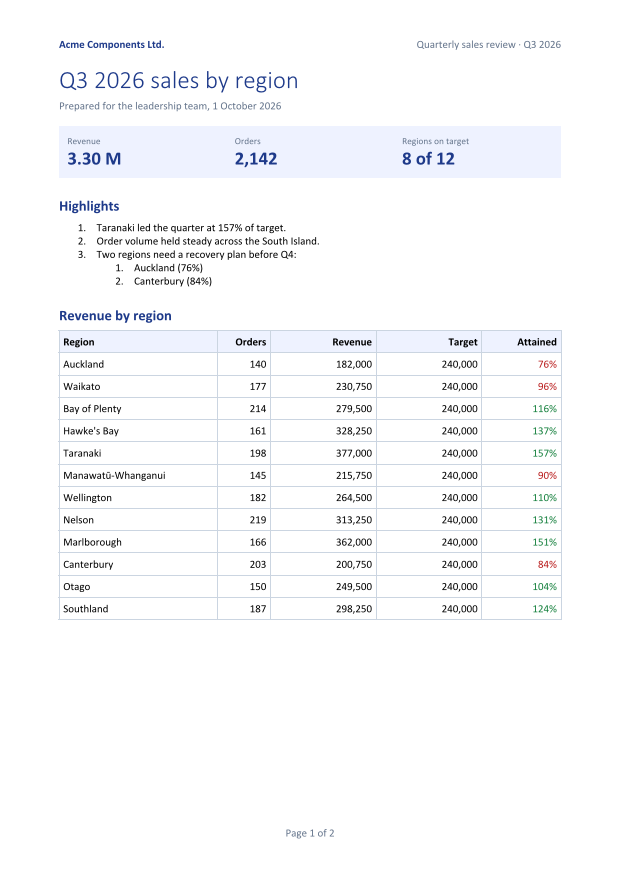 Page 1
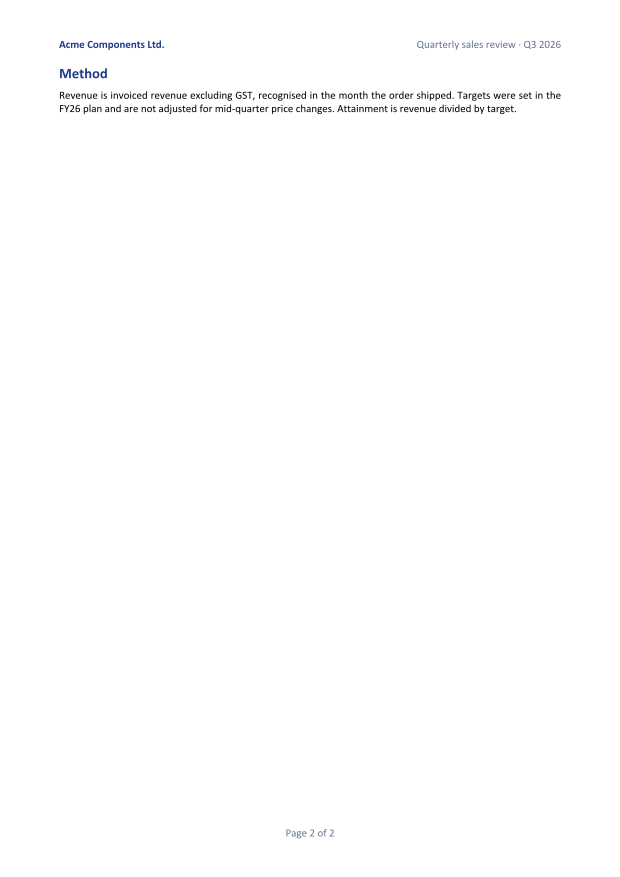 Page 2
How the pieces fit
ComposedDocument.Createtakes a callback that receives anIDocumentComposer. Use it to define styles and add pages. EachPage(...)becomes a Word section, so a second call starts a section with its own size, margins and headers.- A container holds one block.
page.Content(), a table cell or a column item each takes exactly one child. UseColumn(...)to stack several, andRow(...)to put them side by side. CallingTexttwice on the same container throwsInvalidOperationExceptionat compose time. - Styles are real.
DefineStylecreates a Word paragraph style, and.Style("id")applies it. Change the style once and every heading follows, in the PDF and in Word. - Page numbers are fields.
CurrentPageNumber()andTotalPages()become Word'sPAGEandNUMPAGESfields. They are filled in per page during layout. - Output is your choice.
GeneratePdf,GeneratePdfBytes,GenerateImages,SaveAsDocx, orToWordDocument()for further editing with the DOM API.
Things that behave differently from HTML and CSS
Note
Composition produces a Word document, and Word's layout rules apply.
Rowis a borderless one-row table, which is how Word places things side by side. Rows inside rows are nested tables.Paddingis not a box model. On a block it becomes paragraph spacing and indent, and in a table cell it becomes the cell margin. Vertical padding therefore merges with the spacing of neighbouring paragraphs, as Word's spacing does. When you want a guaranteed gap, useSpacingBeforeorSpacingAfteron the text.- The composer never breaks pages; the layout engine does. There is no "fit the remaining space" or shrink-to-fit, because the page is not known until layout.
PageBreak()exists because an explicit break is an instruction, not a measurement.
Units and sizes
Every size takes an optional Unit: Point (the default), Millimetre, Centimetre or Inch. PageSizes provides A0–A6, Letter, Legal, Tabloid and Executive, and .Landscape() turns any of them. For any other size, pass width and height directly: page.Size(210, 297, Unit.Millimetre).
Deterministic output
Compose the same data twice and you get byte-identical PDF and DOCX files. That makes composed documents easy to test: store a hash, or compare the rendered page images.
Next steps
- The API reference lists every Composition member, including images, dividers, hyperlinks and column spans.
- Fill a template from JSON when a designer owns the layout in Word.