Mail merge: data sources and options
The invoice tutorial merges typed C# objects. This page covers every other way to feed a merge (CSV files, databases, dictionaries) and the options that shape the output.
Any data source: IMergeDataReader
A merge reads records through a four-member, forward-only interface shaped like DbDataReader. This one reads a CSV file:
using DocWright.MailMerge;

/// <summary>
/// Merge data from a CSV file. Any source - a DbDataReader, a DataTable, an API - plugs in
/// through the same four members, so DocWright.MailMerge never depends on System.Data.
/// </summary>
internal sealed class CsvMergeReader : IMergeDataReader
{
    private readonly string[] columns;
    private readonly List<string[]> rows;
    private int index = -1;

    public CsvMergeReader(string path)
    {
        string[] lines = File.ReadAllLines(path);
        this.columns = lines[0].Split(',');
        this.rows = lines.Skip(1).Select(l => l.Split(',')).ToList();
    }

    public int FieldCount => this.columns.Length;

    public string GetFieldName(int index) => this.columns[index];

    public object? GetValue(int index) => this.rows[this.index][index];

    public bool Read() => ++this.index < this.rows.Count;   // called before the first record
}
Merge with it:
using System.Globalization;
using DocWright;
using DocWright.Dom;
using DocWright.MailMerge;

using WordDocument letters = converter.Load(File.OpenRead("letter-template.docx"));

var options = new MailMergeOptions
{
    Culture = CultureInfo.GetCultureInfo("en-US"),
    RecordSeparator = MergeRecordSeparator.PageBreak,      // each letter on a new page
    RemoveEmptyParagraphs = true,                          // the default: drops the empty «MiddleName» line

    // Change a value just before it is written.
    FieldMerging = e =>
    {
        if (e.FieldName == "City" && e.RegionName is null)
        {
            e.Value = e.Value?.ToUpperInvariant();
        }
    },
};

MergeResult result = letters.Execute(new CsvMergeReader("customers.csv"), options);
Console.WriteLine($"{result.RecordsMerged} letters, {result.ParagraphsRemoved} empty line(s) removed");

using (FileStream pdf = File.Create("letters.pdf"))
{
    converter.Convert(letters, pdf);
}
Output
5 letters, 2 empty line(s) removed
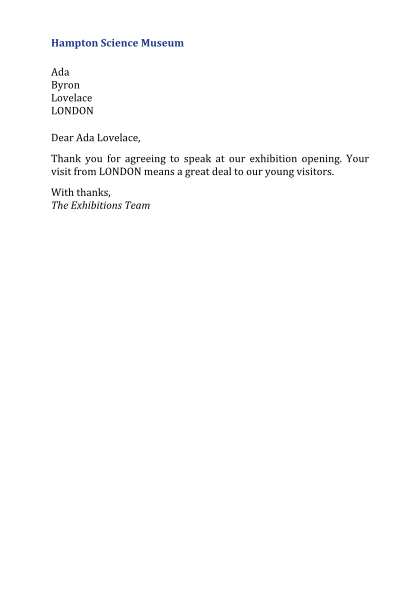 Ada has a middle name
 Grace doesn't: the empty line is removed
customers.csv test fixture.- Field names match case-insensitively.
- Return typed values (
decimal,DateTime), not strings, where you have them. Values are formatted underMailMergeOptions.Culture, and numeric switches such as\# "#,##0.00"need a number. - Wrapping a
DbDataReadertakes one line per member:FieldCount,GetName(i),GetValue(i)andRead(). - For repeating regions, also implement
IMergeRelationSource.TryGetRelation(name, out reader)on the same class and return a reader for the child rows. The child reader must be positioned before its first row.
The other data sources
| Source | Call |
|---|---|
| Typed objects, trim- and AOT-safe | MergeDataSource.FromObjects(records, map) with a MergeFieldMap<T>. See the tutorial. |
| Typed objects, by reflection | MergeDataSource.FromObjectsByReflection(records). Convenient, but not trim-safe. |
| Dictionaries | MergeDataSource.FromDictionaries(rows). A nested IEnumerable under a region's name supplies its rows. |
| One record | document.Execute(dictionary), as below. |
using DocWright.Dom;
using DocWright.MailMerge;

// One letter from a dictionary: no data source needed.
using WordDocument single = converter.Load(File.OpenRead("letter-template.docx"));
single.Execute(new Dictionary<string, object?>
{
    ["FirstName"] = "Annie",
    ["LastName"] = "Easley",
    ["City"] = "Cleveland",
});
Options
| Option | Default | Notes |
|---|---|---|
Culture |
invariant | Formats numbers and dates. Always set it. It is never taken from the machine. |
RecordSeparator |
PageBreak |
None runs records together, for labels and lists. SectionBreak separates records with a section break; in the current version it is a continuous break, so records share a page. |
RemoveEmptyParagraphs |
true |
A paragraph that held only empty fields disappears. One with other text too keeps that text. |
UnmergedFields |
Keep |
What to do with fields the data has no column for: RemoveField keeps their text, RemoveFieldAndText removes both. |
RemoveEmptyGroups |
false |
Remove a region whose collection was empty. |
TrimWhitespace |
false |
Trim each value. |
MaxRecords |
0 (no limit) | Stops the merge quietly at this count. Check RecordsMerged. |
MaxRegionDepth |
16 | Limit on nested regions. |
FieldMerging |
null |
A callback that can change each value: FieldName, Value, HasValue, RecordIndex, RegionName. |
ImageResolving |
null |
Supplies images for image merge fields. |
Diagnostics |
null |
Where merge diagnostics go. |
Images
An image merge field, written «Image:FieldName» in the template, gets its picture only through your callback. Returning null removes the field. DocWright never fetches a URL or file path named in a template, including in INCLUDEPICTURE fields, because a template is untrusted input:
options.ImageResolving = request => request.Value is null
    ? null                                             // no image for this record
    : new MergeImage(File.ReadAllBytes(request.Value), "image/png");
The image takes the size of the template's placeholder picture unless you set Width and Height (in Emu).
The result
MergeResult reports RecordsMerged, RecordsSkipped (by a SKIPIF field), FieldsMerged, FieldsUnmerged, ParagraphsRemoved and UnmergedFieldNames. A name in UnmergedFieldNames is almost always a typo in the template. Log it.
The merged document contains no fields, only their text. Merging the same data twice produces byte-identical files. Headers, footers, text boxes and notes are merged too.