Tutorial: Generate invoices with mail merge
Take a Word invoice template with merge fields, merge a list of orders into it with a repeating table of line items, and save one document holding every invoice as both DOCX and PDF.
You will learn to:
- read the merge fields and regions a template contains, and validate it before merging
- map your own C# types to merge fields in a way that is safe for trimming and NativeAOT
- repeat a table row once per line item with a
TableStart/TableEndregion - produce one invoice per order, each starting on a new page
Before you start
Add the mail-merge package to a project that already references DocWright:
dotnet add package DocWright.MailMerge
Step 1: Look at the template
A merge template is an ordinary .docx. Its author inserts merge fields in Word (Insert › Quick Parts › Field › MergeField), and they appear as «FieldName». Download the template this tutorial uses: invoice-template.docx.
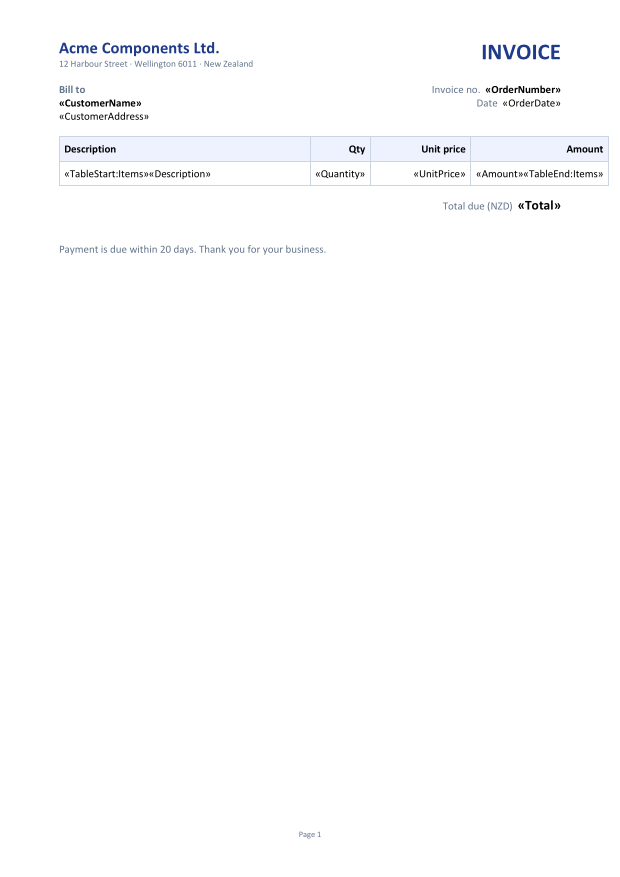
«TableStart:Items» and ends with «TableEnd:Items», which makes it a repeating region: the row is copied once per line item.Two kinds of field appear in it:
| Field | Meaning |
|---|---|
«CustomerName», «Total» … |
Replaced by a value from the current record. |
«TableStart:Items» … «TableEnd:Items» |
Marks a region that repeats once per row of the record's Items collection. Placed in a table row, it repeats the row, not the whole table. |
A field can carry a Word format switch. «Amount \# "#,##0.00"» formats the value with two decimals and thousands separators.
Step 2: Describe your data
These are ordinary C# records. An order has a collection of lines, and that collection feeds the Items region:
public sealed record Order(
    string Number,
    DateTime Date,
    string Customer,
    string Address,
    IReadOnlyList<OrderLine> Lines)
{
    public decimal Total => this.Lines.Sum(l => l.Amount);
}

public sealed record OrderLine(string Description, int Quantity, decimal UnitPrice)
{
    public decimal Amount => this.Quantity * this.UnitPrice;
}
And some orders to merge:
using System.Globalization;
using DocWright;
using DocWright.Dom;
using DocWright.MailMerge;

var orders = new List<Order>
{
    new("INV-1001", new DateTime(2026, 9, 1), "Harbourside Dental", "4 Quay Road, Auckland",
    [
        new("Sterilisation trays", 12, 38.50m),
        new("Examination gloves (box of 100)", 40, 11.90m),
        new("Dental mirrors", 25, 6.75m),
    ]),
    new("INV-1002", new DateTime(2026, 9, 3), "Kōwhai Veterinary Clinic", "88 Rata Street, Nelson",
    [
        new("Surgical drapes", 30, 4.20m),
        new("Suture kits", 15, 22.00m),
    ]),
    new("INV-1003", new DateTime(2026, 9, 4), "Southern Lakes Physio", "2 Ardmore Street, Wānaka",
    [
        new("Treatment table covers", 50, 3.10m),
        new("Resistance bands, assorted", 20, 9.95m),
        new("Hot and cold packs", 16, 14.50m),
        new("Massage oil, 1 L", 6, 27.80m),
    ]),
};
Step 3: Map, validate and merge
using System.Globalization;
using DocWright;
using DocWright.Dom;
using DocWright.MailMerge;

// 1. Map template field names to your data. Explicit accessors are trim- and AOT-safe.
var culture = CultureInfo.GetCultureInfo("en-NZ");
var map = new MergeFieldMap<Order>()
    .Add("OrderNumber", o => o.Number)
    .Add("OrderDate", o => o.Date.ToString("d MMMM yyyy", culture))
    .Add("CustomerName", o => o.Customer)
    .Add("CustomerAddress", o => o.Address)
    .Add("Total", o => o.Total)
    .AddRelation("Items", o => o.Lines, new MergeFieldMap<OrderLine>()
        .Add("Description", l => l.Description)
        .Add("Quantity", l => l.Quantity)
        .Add("UnitPrice", l => l.UnitPrice)
        .Add("Amount", l => l.Amount));

var converter = new DocWrightConverter();
using WordDocument document = converter.Load(File.OpenRead("invoice-template.docx"));

// 2. Check the template before binding any data.
document.ValidateMergeRegions();
Console.WriteLine("Fields:  " + string.Join(", ", document.GetMergeFieldNames()));
Console.WriteLine("Regions: " + string.Join(", ", document.GetMergeRegionNames()));

// 3. Merge: one invoice per order, each starting on a new page.
MergeResult result = document.Execute(
    MergeDataSource.FromObjects(orders, map),
    new MailMergeOptions
    {
        Culture = culture,   // formats numbers; never taken from the machine
        RecordSeparator = MergeRecordSeparator.PageBreak,
    });

Console.WriteLine($"Merged {result.RecordsMerged} invoices, {result.FieldsMerged} fields.");

// 4. Save the merged document as Word and as PDF.
using (FileStream docx = File.Create("invoices.docx"))
{
    converter.Save(document, docx);
}

using (FileStream pdf = File.Create("invoices.pdf"))
{
    converter.Convert(document, pdf);
}
Output
Fields:  Amount, CustomerAddress, CustomerName, Description, OrderDate, OrderNumber, Quantity, Total, UnitPrice
Regions: Items
Merged 3 invoices, 51 fields.
Here is what each step does:
- Map the fields.
MergeFieldMap<T>pairs each field name in the template with an accessor on your type.AddRelationnames the collection that feeds a region, with its own map for the child rows. Names match case-insensitively. Explicit accessors keep working when your application is trimmed or compiled with NativeAOT;MergeDataSource.FromObjectsByReflectionis the reflection-based shortcut for everything else. - Validate the template.
ValidateMergeRegionsthrowsMergeTemplateException, naming the region, when a region is malformed, for example opened and never closed. Run it when a template is uploaded, while its author is still there to fix it.GetMergeFieldNamesandGetMergeRegionNameslist what the template asks for. - Merge.
Executewalks the records and appends one filled copy of the template for each, separated byRecordSeparator. It returns aMergeResultwith counts, plusUnmergedFieldNames: any field the data had no value for, which is almost always a typo in the template. - Save. The merged document is an ordinary
WordDocument. Save it as DOCX, or render it straight to PDF.
The result
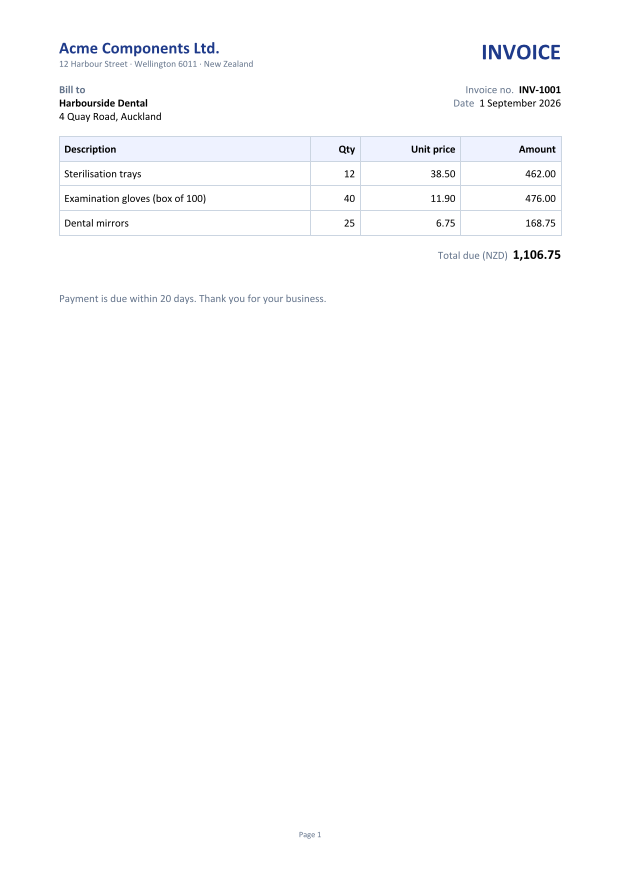 Page 1: INV-1001
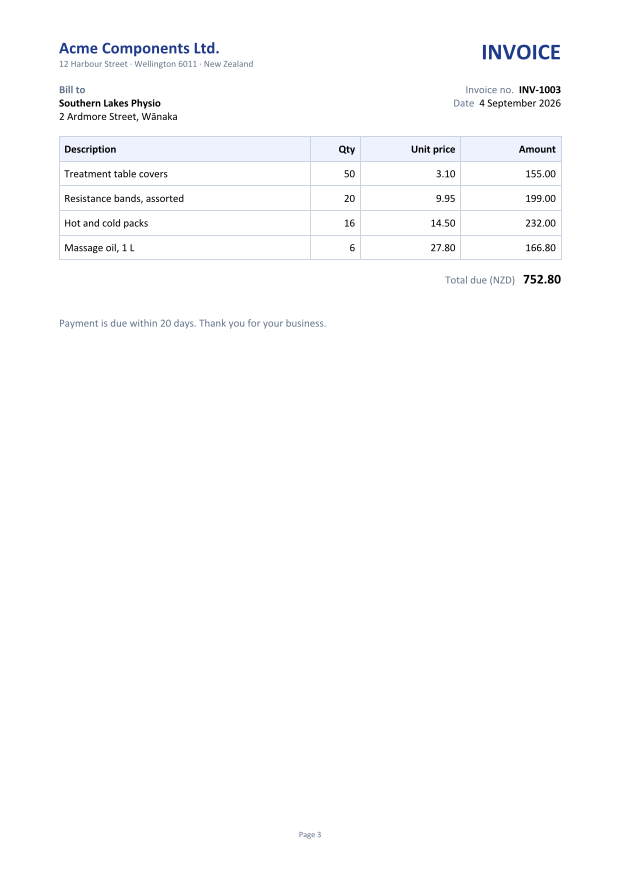 Page 3: INV-1003
Choices worth making
Important
Set the culture explicitly. MailMergeOptions.Culture defaults to the invariant culture, never the machine's. That way an invoice total formats the same on a server in Istanbul as on your laptop. Set it to the culture your customers read.
Tip
Format dates in the map. Pass a date as the exact text you want, for example o.Date.ToString("d MMMM yyyy", culture), rather than relying on the field's \@ date switch.
| Option | Default | Use it to… |
|---|---|---|
RecordSeparator |
PageBreak |
Use SectionBreak when each copy needs its own headers or page setup, or None for labels and lists. |
UnmergedFields |
Keep |
Remove fields the data had no value for: RemoveField keeps their text, RemoveFieldAndText removes both. |
RemoveEmptyParagraphs |
true |
Drop a line that held only an empty field, such as a missing second address line. |
RemoveEmptyGroups |
false |
Remove a region whose collection was empty, instead of leaving its template row behind. |
MaxRecords |
0 (no limit) |
Cap the output when the data comes from outside. The walk stops quietly at the cap, so compare RecordsMerged yourself. |
FieldMerging |
null |
Change a value just before it is written, for example to show "—" for a missing total. |
ImageResolving |
null |
Supply images for image merge fields. DocWright never fetches a URL or path from a template itself. |
Other data sources
MergeDataSource also merges from dictionaries (FromDictionaries, or FromDictionary for a single letter). Anything else, such as a DataTable or a DbDataReader, plugs in through IMergeDataReader, a four-member interface shaped like DbDataReader. The mail-merge package therefore never depends on System.Data. The mail merge data sources guide shows an implementation.
Next steps
- Fill a
{{placeholder}}template from JSON for templates written with plain text markers instead of Word fields. - Build a report in code when there is no template at all.