Save an Excel workbook as PDF, images or HTML
One object, SpreadsheetConverter, saves an opened workbook as PDF, as images and as HTML. The PDF is what Excel's own export writes, page for page.
dotnet add package DocWright.Spreadsheet.Rendering
DocWrightConverter converts Word documents and does not take a workbook. Make one SpreadsheetConverter and use it for every workbook: it reads the machine's fonts once and is safe to use from several threads.
A workbook as PDF
using DocWright.Spreadsheet;
using DocWright.Spreadsheet.Rendering;

// One converter for every workbook: it reads the machine's fonts once.
var converter = new SpreadsheetConverter();

using (FileStream pdf = File.Create("book.pdf"))
{
    converter.ToPdf(workbook, pdf);          // every visible sheet, each by its page setup
}
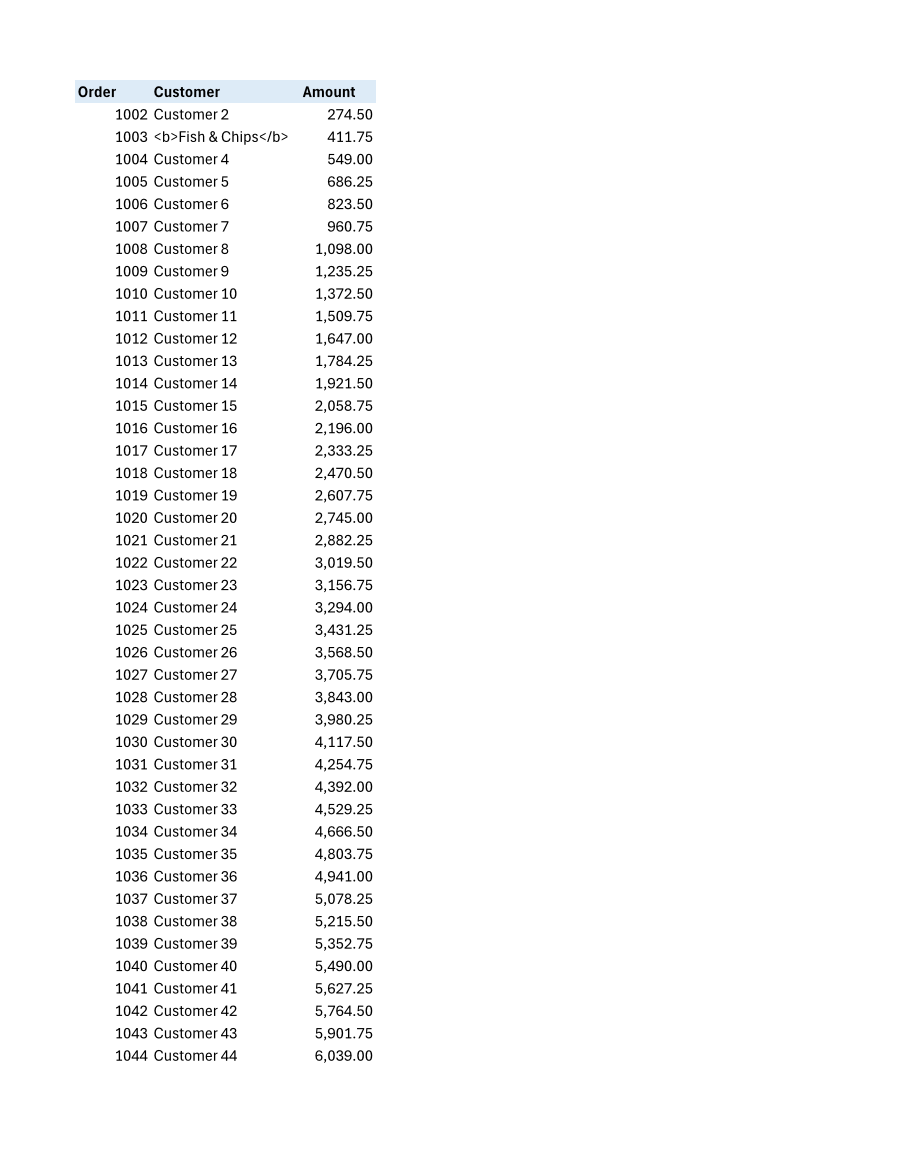
Download the file it wrote: book.pdf.
ToPdf writes every visible worksheet in the workbook's order, each by its own print area and page setup, and leaves a hidden sheet out. The workbook's title, author, subject and keywords become the PDF's.
Note
Checked against Excel. For a workbook with a print area, a second sheet and a hidden sheet, Excel's own export is 2 pages for the workbook, 3 with print areas ignored, 1 for a sheet and 1 for a range. ToPdf gives the same count for each. How a sheet is laid out is on An Excel sheet as PDF or a picture.
Sheets, ranges, tagging and PDF/A
using DocWright.Renderers.Pdf;
using DocWright.Spreadsheet;
using DocWright.Spreadsheet.Rendering;

using (FileStream pdf = File.Create("orders-tagged.pdf"))
{
    converter.ToPdf(workbook, pdf, new SpreadsheetPdfOptions
    {
        TaggedPdf = true,                                                // a table of rows and cells for each sheet
        Language = "en",                                                 // what a screen reader is told
        Metadata = new PdfRenderMetadata { Title = "Orders", Conformance = PdfConformanceLevel.PdfA2b, CreationDate = new DateTimeOffset(2026, 11, 18, 0, 0, 0, TimeSpan.Zero) },
        Layout = new SpreadsheetLayoutOptions
        {
            Sheets = new[] { "Orders" },                                 // by name
            IgnorePrintAreas = true,                                     // the sheet in full
        },
    });
}
SpreadsheetPdfOptions |
Default | Meaning |
|---|---|---|
Layout |
the sheets' own page setup | A SpreadsheetLayoutOptions: Sheets by name, IgnorePrintAreas, one Range as given, Scale, Gridlines, Headings, Limits, Diagnostics. |
TaggedPdf |
false |
Tags each sheet as a table of rows and cells in reading order. A cell of the sheet's print title rows or columns is a header cell. The grid, headings, header and footer, fills and borders are artifacts. |
Metadata |
none | A PdfRenderMetadata: the conformance level, and a title, author, subject and keywords of your own. |
IncludeDocumentProperties |
true |
The workbook's title, author, subject and keywords are written where Metadata states none. |
Pages |
all | A range of the pages of the result. |
Only cells that show something are in a tagged table.
Images
using DocWright.Renderers.Imaging;
using DocWright.Spreadsheet;
using DocWright.Spreadsheet.Rendering;

// The printed pages.
IReadOnlyList<byte[]> pages = converter.ToImages(workbook, new SpreadsheetImageOptions
{
    Image = new ImageRenderOptions { Dpi = 96 },
});

// One image for each sheet, as large as its cells.
IReadOnlyList<byte[]> sheets = converter.ToImages(workbook, new SpreadsheetImageOptions
{
    Layout = new SpreadsheetLayoutOptions { Pagination = SpreadsheetPagination.SinglePage },
    Image = new ImageRenderOptions { Dpi = 96, Format = ImageOutputFormat.Jpeg },
});

// One range, as a PNG.
byte[] range = converter.RenderRange(orders, new XlsxCellRange(1, 1, 6, 3));       // A1:C6
File.WriteAllBytes("orders-top.png", range);
Console.WriteLine($"{pages.Count} pages, {sheets.Count} sheets");
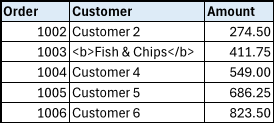
ToImages returns the encoded images in order. SpreadsheetImageOptions.Image is the image renderer's own ImageRenderOptions: format, resolution and size.
HTML
using DocWright.Spreadsheet;
using DocWright.Spreadsheet.Rendering;

using (var html = new StreamWriter("book.html"))
{
    converter.ToHtml(workbook, html, new SpreadsheetHtmlOptions
    {
        SheetLayout = SpreadsheetHtmlSheets.Tabs,        // one sheet at a time; Stacked is the default
    });
}
Download the page it wrote: book.html.
Output
tagged: True
3 pages, 2 sheets
-- the summary sheet's table
<table>
<colgroup><col style="width:9.14ch"/><col style="width:9.14ch"/></colgroup>
<tbody>
<tr><td colspan="2">Orders in the book</td></tr>
<tr><td>Count</td><td class="dw-s2">59</td></tr>
</tbody>
</table>
MaxCells: The workbook is more cells as HTML than the limit of 100.
title in the workbook: (none)
The page is self-contained: one <style> block and a table for each sheet.
| In the table | |
|---|---|
| A cell | The text Excel shows. See Show a cell as Excel shows it. |
| Numbers | At the right, as in Excel. |
| Formatting | Bold, italic, underline, colour, fill and borders as CSS. |
| Column widths | A <col> for each column, in characters. |
| A merged range | colspan and rowspan. |
| Print title rows or columns | <th> cells. |
| Hidden rows and columns | Left out. |
| What it covers | From A1 to the last cell that prints, whatever the print area. |
SpreadsheetHtmlOptions |
Default | Meaning |
|---|---|---|
Sheets |
every visible worksheet | The sheets to write, by name. |
SheetLayout |
Stacked |
Tabs shows one sheet at a time behind tabs made of radio buttons and labels. |
InlineStyles |
false |
true puts each cell's formatting in a style attribute instead of a class. |
Title |
the workbook's title | The page's title. |
MaxCells |
1,000,000 | The most cells written, empty ones included. |
Diagnostics |
none | Where what is not written is reported. |
Important
A cell is text somebody else wrote. Every character of it is escaped, and the page holds no script: the sample's cell <b>Fish & Chips</b> is written as text. The only thing of a workbook that reaches CSS is a font's name, reduced to its letters, digits, spaces and hyphens. The output is well-formed XML as well as HTML.
Limits
using DocWright.Core;
using DocWright.Spreadsheet.Rendering;

// A table is as large as the sheet's cells reach: past MaxCells (1,000,000 by default) it is refused.
try
{
    converter.ToHtml(workbook, TextWriter.Null, new SpreadsheetHtmlOptions { MaxCells = 100 });
}
catch (ResourceLimitExceededException error)
{
    Console.WriteLine($"{error.LimitName}: {error.Message}");
}
A table is as large as the sheet's cells reach, not as its file is, so MaxCells refuses a larger one. For PDF and images the limit is Layout.Limits.MaxPages (100,000 pages when not set).
What is not converted
| Formulas | Nothing is calculated unless you call Calculate first (Calculate formulas). A formula shows the result the file stores; when cells were changed since and a formula is shown, one DXP2002 warning says so. |
| Charts | Drawn in PDF and images where their anchors put them, but radar, bubble, surface, stock and 2016 charts (Charts); not written as HTML. |
| Shapes, comments | Not drawn and not written; reported with DXP2001. Pictures are drawn in PDF and images. |
| Icon sets and formula rules, text rotation, text formatted in parts | Not applied (the cell's own font for rich text); reported with DXP2002 for PDF and images. Other conditional formats are drawn. |
| Row heights | Not written as HTML. |
Pass a collector as Layout.Diagnostics (PDF and images) or Diagnostics (HTML) to read these.