An Excel sheet as PDF or a picture
A worksheet is laid out on the pages Excel's own print of it has, and the pages are drawn as PDF or as images. Sizes and positions are Excel's, measured from its own PDFs.
dotnet add package DocWright.Spreadsheet.Rendering
dotnet add package DocWright.Renderers.Pdf
DocWrightConverter converts Word documents and does not take a workbook. A workbook is laid out by SpreadsheetLayout and drawn by a renderer.
A workbook as PDF
using DocWright.Core.Diagnostics;
using DocWright.Core.Rendering;
using DocWright.Fonts;
using DocWright.Renderers.Pdf;
using DocWright.Spreadsheet;
using DocWright.Spreadsheet.Rendering;

var fonts = new FontEngine(new FontEngineOptions());

// The pages Excel's own print of the workbook has: every visible worksheet, one after another.
LayoutDocument pages = SpreadsheetLayout.Layout(workbook, fonts);

using (FileStream pdf = File.Create("orders.pdf"))
{
    new PdfLayoutRenderer(fonts).Render(pages, pdf, new RenderOptions(), NullConversionDiagnostics.Instance);
}

Console.WriteLine($"{pages.Pages.Count} pages of {pages.Pages[0].Width.Value / 20} x {pages.Pages[0].Height.Value / 20} pt");
Output
2 pages of 612 x 792 pt
paper 1, landscape False, scale 100%, left margin 0.7 in
print areas 0, title rows 0-0, grid printed False
1 page, 1 picture
at 50%: 1 page
an empty bold cell in A150: 1 page
an empty red cell in A150: 4 pages
MaxPages: The sheet 'Sheet1' is more pages than the limit of 1.
DXP2002 The sheet 'Sheet1' has text turned to an angle; it is drawn level.
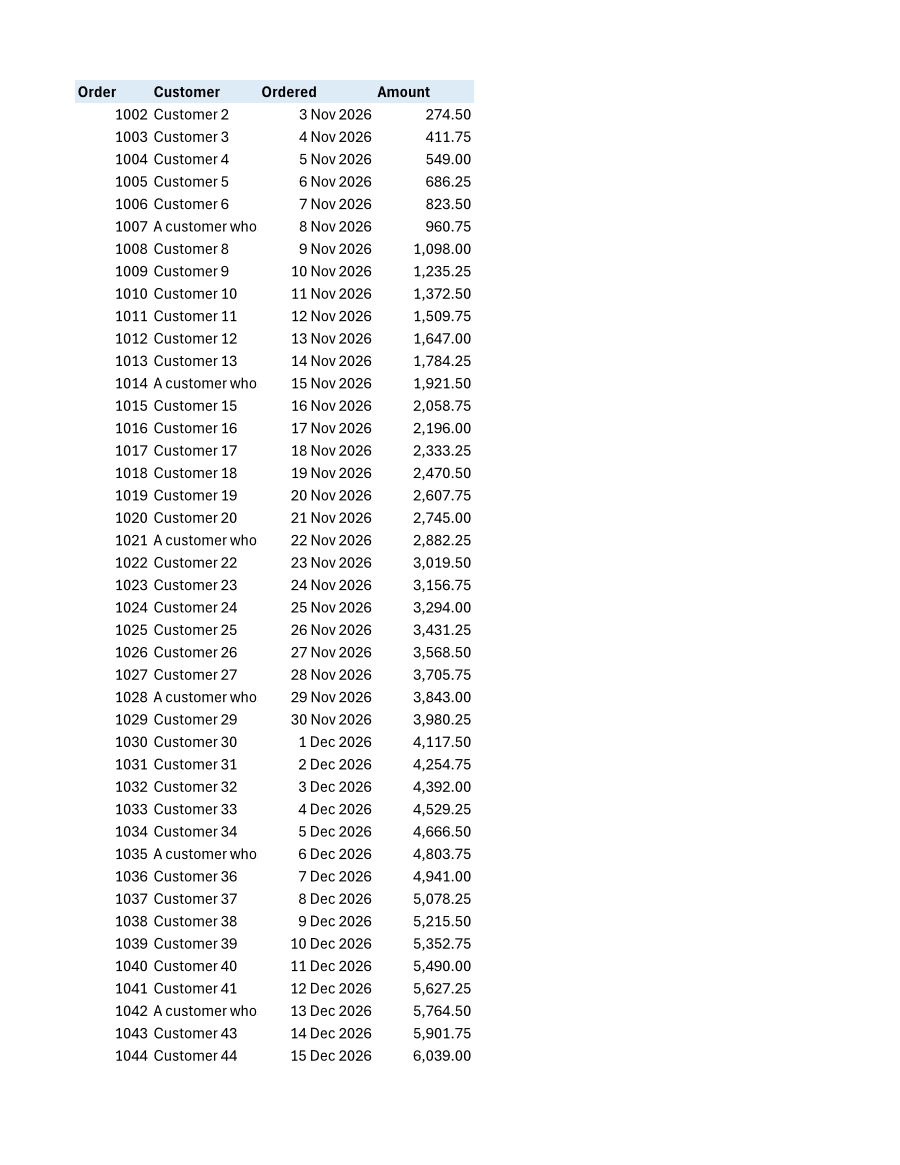
Download the file it wrote: orders.pdf.
Layout(workbook, fonts) lays out every visible worksheet in order, with pages numbered through. Layout(sheet, fonts) lays out one.
| A page follows the sheet's | |
|---|---|
| Paper, orientation, margins | Letter and Excel's default margins when the sheet says nothing. |
| Scale, or fit to pages | Fit finds the largest scale that fits, never above 100 %. |
| Print area | See "What is printed" below. |
| Manual breaks, page order | Down then over, or over then down. |
| Title rows and columns | Repeated on the pages after them. |
| Centring, printed grid, printed headings | |
| Header and footer | Text, the page number (&P), the page count (&N) and the sheet's name (&A). |
| A cell shows | |
|---|---|
| The text Excel shows | Its value through its number format. See Show a cell as Excel shows it. |
| Font, colour, bold, italic, underline, strike | A font the machine lacks is substituted and reported. |
| Alignment, indent, wrap | Text at the left and numbers at the right when the cell says nothing. |
| Text too long for its cell | Runs over the empty cells beside it; cut at a cell that holds something. |
| A number too wide | A run of #. |
| A merged range | One box. |
| Fill and borders | Thin, medium, thick, hair and double. |
Note
Checked against Excel. On the workbooks in DocWright's test corpus the pages are Excel's and every cell's text is within 0.12 pt of where Excel's own PDF puts it. A printed sheet is not the size the screen shows: Excel prints on a grid of 600 dots per inch and scales by the default font, so under Aptos Narrow 11 a printed column is 7.5 % wider than on screen. DocWright does the same.
What is printed
With no print area, a sheet prints from A1 to the last cell that puts something on paper: a value, a fill, a border or a merged range. A font, a number format or a row's height alone prints nothing.
using DocWright.Core.Rendering;
using DocWright.Spreadsheet;
using DocWright.Spreadsheet.Rendering;

// A fill far below the data is printed, as Excel prints it; a font alone is not.
XlsxDocument sparse = XlsxDocument.Create();
XlsxDocumentSheet sheet = sparse.Sheets[0];
sheet.SetValue("A1", XlsxCellValue.Text("Data"));
sheet.SetStyle("A150", sparse.DefaultStyle.With(bold: true));
Console.WriteLine($"an empty bold cell in A150: {SpreadsheetLayout.Layout(sparse, fonts).Pages.Count} page");

sheet.SetStyle("A150", sparse.DefaultStyle.With(backgroundColor: ColorRgb.FromRgb(255, 0, 0)));
Console.WriteLine($"an empty red cell in A150: {SpreadsheetLayout.Layout(sparse, fonts).Pages.Count} pages");
A print area is cut to that last cell too. An area of whole columns, such as $A:$F, ends at the last printing cell in its own columns, so it is the pages its cells fill and not a million rows. An area with nothing in it is not a page. These are Excel's own page counts.
SpreadsheetLayoutOptions.Range replaces the print area and is laid out exactly as given, blank rows included.
The sheet's page setup
using DocWright.Spreadsheet;

XlsxDocumentPageSetup setup = orders.PageSetup;
Console.WriteLine($"paper {setup.PaperSize}, landscape {setup.Landscape}, scale {setup.Scale}%, left margin {setup.LeftMarginInches} in");
Console.WriteLine($"print areas {setup.PrintAreas.Count}, title rows {setup.FirstTitleRow}-{setup.LastTitleRow}, grid printed {setup.PrintGridlines}");
XlsxDocumentSheet.PageSetup is what the sheet says, with Excel's defaults where it says nothing. PaperSize is Windows' paper number (1 is Letter, 9 is A4). The header and footer are in Excel's notation. Every member has a setter too: see Page setup, panes and properties.
A range as a picture
using DocWright.Core.Diagnostics;
using DocWright.Core.Rendering;
using DocWright.Renderers.Imaging;
using DocWright.Spreadsheet;
using DocWright.Spreadsheet.Rendering;

// One page exactly as large as a range, with the grid: a picture of part of a sheet.
LayoutDocument picture = SpreadsheetLayout.Layout(orders, fonts, new SpreadsheetLayoutOptions
{
    Pagination = SpreadsheetPagination.SinglePage,
    Range = new XlsxCellRange(1, 1, 8, 4),          // A1:D8
    Gridlines = true,
});

var images = new List<byte[]>();
var imageOptions = new ImageRenderOptions { Dpi = 144, Format = ImageOutputFormat.Png, PageEncoded = (_, bytes) => images.Add(bytes) };
new ImageLayoutRenderer(fonts, imageOptions).Render(picture, Stream.Null, new RenderOptions(), NullConversionDiagnostics.Instance);
File.WriteAllBytes("orders-range.png", images[0]);
Console.WriteLine($"{picture.Pages.Count} page, {images.Count} picture");
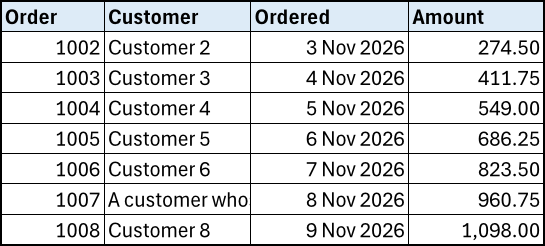
SpreadsheetPagination.SinglePage gives one page for each sheet, exactly as large as its cells, with no margins, header or footer.
Options
using DocWright.Core.Rendering;
using DocWright.Spreadsheet.Rendering;

LayoutDocument half = SpreadsheetLayout.Layout(workbook, fonts, new SpreadsheetLayoutOptions
{
    Scale = 50,                                     // overrides the sheet's own scale or fit
    Headings = true,                                // row numbers and column letters
    Sheets = new[] { orders.Name },                 // by name; a hidden sheet may be named
});
Console.WriteLine($"at 50%: {half.Pages.Count} page");
SpreadsheetLayoutOptions |
Default | Meaning |
|---|---|---|
Pagination |
Printed |
SinglePage for one page per sheet as large as its cells. |
Sheets |
every visible worksheet | The sheets to lay out, by name. A hidden sheet may be named; a name the workbook lacks is skipped. |
Range |
the sheet's print area | One range, laid out as given. |
Gridlines |
the sheet's setting | Print the grid, or not. |
Headings |
the sheet's setting | Print row numbers and column letters. |
Scale |
the sheet's scale or fit | A percentage, held to 10 to 400. |
Limits |
100,000 pages | ResourceLimits.MaxPages. |
Diagnostics |
none | Where substituted fonts and what is not drawn are reported. |
Limits, and what is not drawn
using DocWright.Core;
using DocWright.Core.Diagnostics;
using DocWright.Spreadsheet;
using DocWright.Spreadsheet.Rendering;

try
{
    SpreadsheetLayout.Layout(workbook, fonts, new SpreadsheetLayoutOptions { Limits = new ResourceLimits { MaxPages = 1 } });
}
catch (ResourceLimitExceededException error)
{
    Console.WriteLine($"{error.LimitName}: {error.Message}");
}

// What a sheet holds that is not drawn as Excel draws it is reported, once for each sheet and kind.
orders.SetStyle("B2", workbook.DefaultStyle.WithTextRotation(45));
var diagnostics = new CollectingConversionDiagnostics();
SpreadsheetLayout.Layout(workbook, fonts, new SpreadsheetLayoutOptions { Diagnostics = diagnostics });
foreach (ConversionDiagnostic diagnostic in diagnostics.Snapshot().Where(d => d.Code == DiagnosticCodes.UnsupportedFeature))
{
    Console.WriteLine($"{diagnostic.Code} {diagnostic.Message}");
}
A sheet of more pages than MaxPages is refused with ResourceLimitExceededException. The same limit bounds the grid a file can ask for without paying for it: a merged range across all 16,384 columns under hundreds of rows, or title rows a million deep, is refused with the same exception and the same LimitName.
| Not drawn as Excel draws it | Reported as |
|---|---|
| Charts, pictures, shapes and comments on the sheet | DXP2001 |
| Conditional formats | DXP2002 |
| Text turned to an angle (drawn level) | DXP2002 |
| Dashed and dotted borders (drawn solid) | DXP2002 |
| Justified, distributed, filled and centred-across-selection cells | DXP2002 |
| A header's or footer's date, time, file name and picture | DXP2002 |
| A pattern fill's pattern (its first colour fills the cell), diagonal borders | not reported |
Each is reported once for each sheet and kind, as a warning.
Positions for a grid view
SpreadsheetGeometry.For(sheet, fonts) gives the sizes Excel shows on screen, without paginating: GetColumnLeft, GetColumnWidth, GetRowTop and GetRowHeight in twips (15 to the screen pixel), GetColumnAt and GetRowAt for a point, FrozenRows, FrozenColumns, and exact pixel members (GetColumnLeftPixels, GetRowTopPixels, GetColumnAtPixel, GetRowAtPixel) for the whole grid.