Tutorial: Build a document-conversion web API
Build an ASP.NET Core minimal API with two endpoints. One turns an uploaded Word document into a PDF, the other returns a PNG thumbnail of its first page. The service is safe to expose: it caps input size, page count and time, and it answers bad uploads with a proper HTTP error instead of a crash.
You will learn to:
- register one
DocWrightConverterfor the whole application - convert request bodies to PDF and PNG with async, cancellable calls
- protect the service with
ResourceLimits - map DocWright exceptions to HTTP status codes
Step 1: Create the project
dotnet new web -n ConversionService
cd ConversionService
dotnet add package DocWright
Step 2: Write the API
Replace Program.cs with the following, and end it with app.Run();. In a dotnet new web project the ASP.NET Core namespaces are imported automatically.
using DocWright;
using DocWright.Core;
using DocWright.Core.Primitives;
using DocWright.Renderers.Imaging;

var builder = WebApplication.CreateBuilder(args);

// One converter for the whole application: thread-safe, and it caches fonts.
builder.Services.AddSingleton<DocWrightConverter>();

var app = builder.Build();

// Limits for documents from strangers. A fresh ConvertOptions per request.
static ConvertOptions UploadOptions()
{
    var options = new ConvertOptions();
    options.Limits.MaxInputBytes = 25L * 1024 * 1024;           // 25 MB
    options.Limits.MaxPages = 500;
    options.Limits.MaxWallClockTime = TimeSpan.FromSeconds(30);
    return options;
}

// POST a document, get a PDF back.
app.MapPost("/convert/pdf", async (
    HttpRequest request, DocWrightConverter converter, CancellationToken ct) =>
{
    // Buffer the upload: conversion needs a seekable stream.
    using var input = new MemoryStream();
    await request.Body.CopyToAsync(input, ct);
    input.Position = 0;

    try
    {
        var output = new MemoryStream();
        await converter.ConvertAsync(input, output, UploadOptions(), ct);
        output.Position = 0;
        return Results.File(output, "application/pdf", "converted.pdf");
    }
    catch (InvalidDocumentException ex)
    {
        return Results.Problem(ex.Message, statusCode: 422);   // Unprocessable Entity
    }
    catch (ResourceLimitExceededException ex)
    {
        return Results.Problem($"Limit exceeded: {ex.LimitName}", statusCode: 413);
    }
});

// POST a document, get a PNG of its first page back.
app.MapPost("/convert/thumbnail", async (
    HttpRequest request, DocWrightConverter converter, int? width, CancellationToken ct) =>
{
    using var input = new MemoryStream();
    await request.Body.CopyToAsync(input, ct);
    input.Position = 0;

    byte[]? png = null;
    var image = new ImageRenderOptions
    {
        Width = Math.Clamp(width ?? 320, 64, 1600),
        PageEncoded = (_, bytes) => png = bytes,
    };

    ConvertOptions options = UploadOptions();
    options.Pages = PageRange.Single(1);
    converter.ConvertToImages(input, image, options);

    return Results.File(png!, "image/png", "page-1.png");
});
Why it's written this way
- One converter, registered as a singleton.
DocWrightConverteris thread-safe and holds no per-request state. It caches the font engine, which takes about a second to build, so creating one per request would make every request slow. - A fresh
ConvertOptionsper request. Options are read once at the start of each conversion. Don't share one options object across requests that might change it. - The upload is buffered first. Readers need a seekable stream. A
MemoryStreamis fine together with theMaxInputByteslimit. For very large files, buffer to a temporary file instead. CancellationToken ctis the request's abort token. If the client disconnects, the conversion stops.- Errors become HTTP statuses. Something that isn't a document gets
422 Unprocessable Entity, and a limit that trips gets413. Anything else from DocWright derives fromDocWrightException, so you can add one morecatchfor a500with your own logging.
Step 3: Call it
Run the service with dotnet run, then post a document to it. From C#:
using System.Net.Http.Headers;

using var http = new HttpClient { BaseAddress = new Uri(baseAddress) };

// A real document.
using (var body = new StreamContent(File.OpenRead("letterhead.docx")))
{
    body.Headers.ContentType = new MediaTypeHeaderValue(
        "application/vnd.openxmlformats-officedocument.wordprocessingml.document");
    HttpResponseMessage pdf = await http.PostAsync("/convert/pdf", body);
    Console.WriteLine($"POST /convert/pdf       -> {(int)pdf.StatusCode} "
                    + pdf.Content.Headers.ContentType);
    await File.WriteAllBytesAsync("letterhead.pdf", await pdf.Content.ReadAsByteArrayAsync());
}

// The first page as a 320 px thumbnail.
using (var body = new StreamContent(File.OpenRead("letterhead.docx")))
{
    HttpResponseMessage png = await http.PostAsync("/convert/thumbnail?width=320", body);
    Console.WriteLine($"POST /convert/thumbnail -> {(int)png.StatusCode} "
                    + png.Content.Headers.ContentType);
    await File.WriteAllBytesAsync("thumbnail.png", await png.Content.ReadAsByteArrayAsync());
}

// Something that is not a document.
HttpResponseMessage bad = await http.PostAsync("/convert/pdf", new StringContent("hello"));
Console.WriteLine($"POST /convert/pdf       -> {(int)bad.StatusCode} (not a document)");
Output
POST /convert/pdf       -> 200 application/pdf
POST /convert/thumbnail -> 200 image/png
POST /convert/pdf       -> 422 (not a document)
Or from a terminal:
curl --data-binary @letterhead.docx http://localhost:5000/convert/pdf -o letterhead.pdf
curl --data-binary @letterhead.docx "http://localhost:5000/convert/thumbnail?width=320" -o thumbnail.png
The result
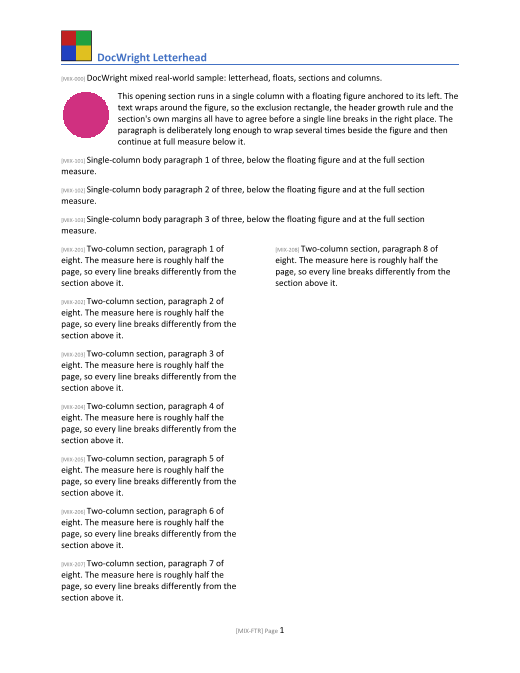 /convert/pdf
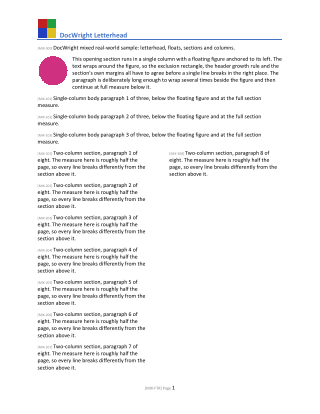 /convert/thumbnail?width=320
Going to production
Important
Install the fonts your documents use. Containers usually have almost no fonts. DocWright falls back to bundled open-licensed faces and reports each substitution, but line breaks only match Word when the real fonts (Calibri, Cambria, Arial…) are available. Copy them into the image and set ConvertOptions.FontDirectories, or install them into the system font folder.
- Limits. The three limits above are a minimum. Hardening untrusted input lists every limit: ZIP-bomb ratios, image pixel counts, nesting depth and memory.
- Concurrency. Conversion is CPU-bound. Bound how many run at once, for example with ASP.NET Core rate limiting or a
SemaphoreSlim, rather than letting a burst of uploads compete for every core. - Large outputs. For big documents, write the PDF to a temporary file and return
Results.File(path, …)instead of holding it in memory. - Health checks. Converting a tiny embedded document at startup warms the font cache, so the first real request is not the slow one.
Next steps
- Handle errors lists every exception type.
- Assemble a board pack adds merge and split endpoints.