Tutorial: Fill a {{placeholder}} template from JSON
Fill a Word quote template from a JSON file. Plain {{Name}} markers are replaced with values, and one table row is repeated once for each item in a JSON array. No mail-merge package is needed: this is find and replace with the edge cases handled.
You will learn to:
- replace
{{placeholders}}in the body, headers and footers in one call - repeat a table row for each element of a JSON array, keeping the table's formatting
- find a node in the document with a
DomVisitor - check that nothing was left unfilled
Tip
Placeholders or mail merge? Use placeholders when template authors type plain {{Name}} markers and you have a flat record with a simple repeating table. Use mail merge when templates use Word merge fields, or when you need nested regions, conditions (IF) or format switches.
Step 1: The template and the data
The template is an ordinary .docx with {{Name}} markers typed as text. Word sometimes splits a marker across several runs of text internally, for example after a spell-check. DocWright finds it anyway. Download: quote-template.docx.
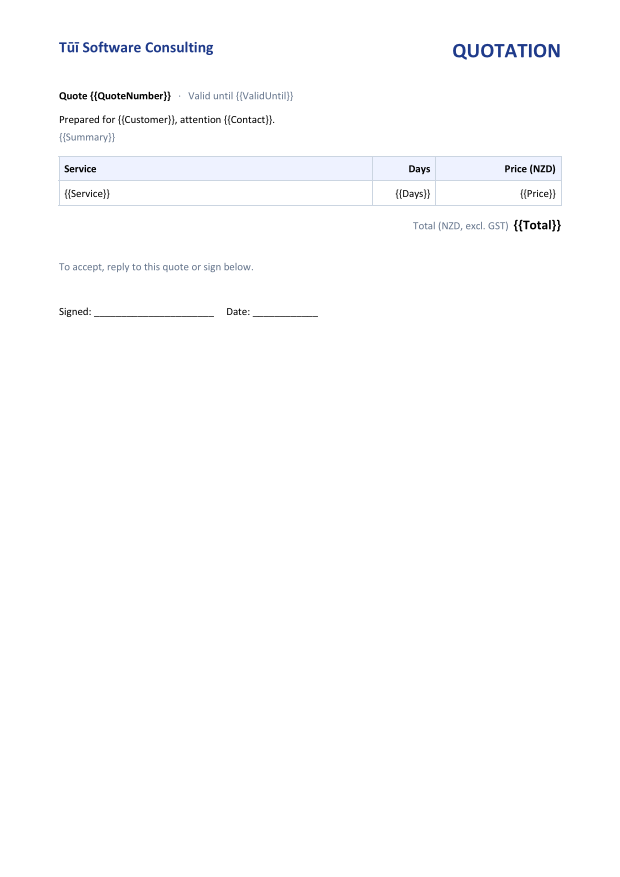
{{Service}}, {{Days}} and {{Price}} is the template row. It is copied once per item and then removed.The data, quote.json:
{
  "QuoteNumber": "Q-2026-118",
  "ValidUntil": "31 October 2026",
  "Customer": "Riverbend Health Trust",
  "Contact": "Mere Tipene",
  "Summary": "Migration of the patient-letter service from Word automation to DocWright.",
  "Total": "33,600.00",
  "Items": [
    { "Service": "Discovery and template audit", "Days": 3, "Price": "4,200.00" },
    { "Service": "Conversion service build", "Days": 10, "Price": "14,000.00" },
    { "Service": "Template migration (40 templates)", "Days": 8, "Price": "11,200.00" },
    { "Service": "Load testing and hand-over", "Days": 3, "Price": "4,200.00" }
  ]
}
Step 2: Find the template row
A small DomVisitor walks the document and stops at the first table row containing {{Service}}. It also records which table owns that row:
using System.Text.Json;
using DocWright;
using DocWright.Dom;
using DocWright.Dom.Editing;

/// <summary>Finds the first table row containing a marker, and the table that owns it.</summary>
internal sealed class TemplateRowFinder(string marker) : DomVisitor
{
    private Table? current;

    public Table? Table { get; private set; }

    public TableRow? Row { get; private set; }

    public override void VisitTable(Table table)
    {
        // Track the innermost table, so a nested table is never mistaken for its parent.
        Table? outer = this.current;
        this.current = table;
        base.VisitTable(table);
        this.current = outer;
    }

    public override void VisitTableRow(TableRow row)
    {
        if (this.Row is null && row.FindText(marker).Count > 0)
        {
            this.Row = row;
            this.Table = this.current;
        }

        base.VisitTableRow(row);
    }
}
Step 3: Fill the template
using System.Text.Json;
using DocWright;
using DocWright.Dom;
using DocWright.Dom.Editing;

// 1. Read the JSON. DocWright has no JSON parser of its own; use System.Text.Json.
using JsonDocument json = JsonDocument.Parse(File.ReadAllText("quote.json"));

static Dictionary<string, object?> Values(JsonElement obj) =>
    obj.EnumerateObject()
       .Where(p => p.Value.ValueKind != JsonValueKind.Array)
       .ToDictionary(p => p.Name, p => (object?)p.Value.ToString());

Dictionary<string, object?> header = Values(json.RootElement);
List<Dictionary<string, object?>> items = json.RootElement.GetProperty("Items")
    .EnumerateArray().Select(Values).ToList();

var converter = new DocWrightConverter();
using FileStream input = File.OpenRead("quote-template.docx");
using WordDocument document = converter.Load(input);

var options = new PlaceholderOptions { Unresolved = UnresolvedPlaceholderAction.Clear };

// 2. Repeat the table row that holds {{Service}}, once per item.
var finder = new TemplateRowFinder("{{Service}}");
document.Accept(finder);
TableRow templateRow = finder.Row ?? throw new InvalidOperationException("No template row.");
Table table = finder.Table!;

int insertAt = table.Rows.IndexOf(templateRow);
foreach (Dictionary<string, object?> item in items)
{
    TableRow row = templateRow.Clone();          // cells, widths, borders and shading come along
    table.Rows.Insert(insertAt++, row);
    row.ReplacePlaceholders(item, options);       // fill this row only
}

table.Rows.Remove(templateRow);

// 3. Fill everything else: body, headers, footers.
PlaceholderResult result = document.ReplacePlaceholders(header, options);
Console.WriteLine($"Replaced {result.ReplacedCount} placeholders, "
                + $"{result.UnresolvedNames.Count} unresolved.");

// 4. Save. Keep the input stream open until here: parts are read from it lazily.
using (FileStream pdf = File.Create("quote-Q-2026-118.pdf"))
{
    converter.Convert(document, pdf);
}

using (FileStream docx = File.Create("quote-Q-2026-118.docx"))
{
    converter.Save(document, docx);
}
Output
Replaced 6 placeholders, 0 unresolved.
The result
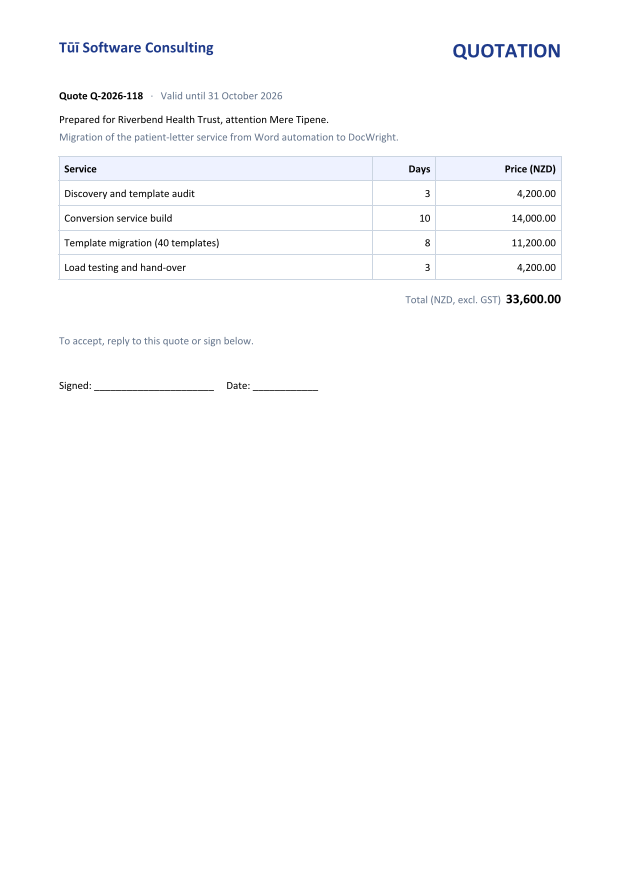
How it works
- Scope is the node you call it on.
ReplacePlaceholdersandFindTextare extension methods on anyDomNode(namespaceDocWright.Dom.Editing). On the document they reach the body, headers, footers, notes and text boxes. On aTableRowthey touch nothing outside that row. - Fill the clone, not the table. Each clone is filled on its own. Calling
table.ReplacePlaceholdersinside the loop would also empty the template row, so every later clone would come out blank. It's a silent bug that looks like a data problem. - Remove the template row afterwards. Left in place, it would print literal
{{Service}}text and throw off the banding of a striped table style. - Table styles survive. The style lives on the table and is recomputed from row position, so header shading and alternating bands land on the right rows.
- One pass. A value that itself contains
{{Something}}is never substituted into. The output never depends on the order of keys.
Options
PlaceholderOptions controls the matching:
| Option | Default | Use it to… |
|---|---|---|
Unresolved |
Leave |
Clear removes markers the data has no key for, and Throw fails instead. Leave makes no edit at all. |
Prefix, Suffix |
{{, }} |
Use other delimiters, such as <<Name>> or ${Name}. |
TrimNames |
true |
Treat {{ Name }} and {{Name}} as the same key. |
MatchCase |
false |
Require the key's case to match exactly. |
Culture |
invariant | Format non-string values (numbers, dates) for a specific culture. |
PlaceholderResult reports ReplacedCount, ResolvedNames and UnresolvedNames. An unresolved name is almost always a typo in the template, so log it. Call document.FindPlaceholderNames() on an uploaded template to show its author which keys it expects.
Next steps
- Fill and update several tables when a template has more than one repeating table, or you need to update a specific table later.
- Generate invoices with mail merge when you need nested regions or Word merge fields.
- Find and replace for editing text without placeholders.