Charts in reports
A Chart in a report draws as a ReportPageChart: its plot, markers, data labels, axes, title and legend become shapes and text, so a chart reaches PDF, images, the browser viewer, Word and Excel. Every rule was measured against the rasters Microsoft's report engine draws.
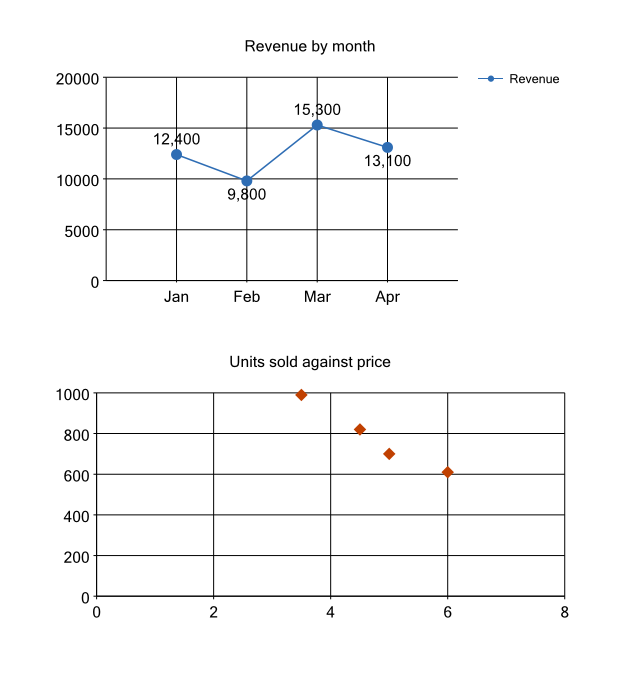
This guide uses chart-points.rdl: a line of monthly revenue with circle markers and value labels, and a scatter of units sold against price.
Give the charts their data
using DocWright.Reporting.Data;

var sales = new ReportDataTable()
    .AddColumn("Month", typeof(string))
    .AddColumn("Revenue", typeof(double))
    .AddColumn("Price", typeof(double))
    .AddColumn("Units", typeof(double))
    .AddRow("Jan", 12400.0, 4.5, 820.0)
    .AddRow("Feb", 9800.0, 6.0, 610.0)
    .AddRow("Mar", 15300.0, 3.5, 990.0)
    .AddRow("Apr", 13100.0, 5.0, 700.0);
var provider = new ReportInMemoryDataProvider().Add("Sales", sales);
Read and draw the charts
using DocWright.Fonts;
using DocWright.Reporting.Pagination;
using DocWright.Reporting.Processing;

var fonts = new FontEngine();
using ReportInstance instance = ReportProcessor.Process(definition, provider, new ReportRunOptions());
ReportPageModel pages = ReportPaginator.Paginate(instance, fonts);

foreach (ReportPageChart chart in pages.Pages[0].Items.OfType<ReportPageChart>())
{
    // Markers are closed, filled paths; data labels and axis numbers are labels.
    int markers = chart.Shapes.OfType<ReportShapePath>().Count(p => p.Closed && p.Fill.HasValue);
    List<string> texts = chart.Shapes.OfType<ReportShapeLabel>().Select(l => l.Text).ToList();
    Console.WriteLine($"{chart.Name}: {markers} markers, labels {string.Join(" ", texts)}");
}
Output:
Revenue: 5 markers, labels Revenue by month Revenue 0 5000 10000 15000 20000 Jan Feb Mar Apr 12,400 9,800 15,300 13,100
PriceUnits: 4 markers, labels Units sold against price 0 200 400 600 800 1000 0 2 4 6 8
using DocWright.Core.Diagnostics;
using DocWright.Core.Rendering;
using DocWright.Renderers.Pdf;

using (FileStream pdf = File.Create("chart-points.pdf"))
{
    new PdfLayoutRenderer(fonts).Render(pages.ToLayoutDocument(), pdf, new RenderOptions(), new CollectingConversionDiagnostics());
}
What is drawn
- Plots: column, bar, line (plain or
Smooth), area, pie, doughnut and scatter, with any number of series.StackedandPercentStackedstack on a column, a bar and an area. - A scatter puts each point at its own
XandYfromChartDataPointValues, on a numeric X axis built the same way as the value axis. A point with noXtakes its category's place, counting from 1. Without a marker each point is a small square in the series' colour. - Markers (
ChartMarker):Square,Circle,Diamond,Triangle,CrossandStar4,Star5,Star6,Star10, at the statedSize, in the marker's own colour or the series'.Autogives each series the next kind in that order. A line's legend swatch shows its marker. - Data labels (
ChartDataLabel): the point's value, formatted by the label'sFormat, or theLabeltext. On a line,Autoputs a label above its point unless the point is lower than its neighbours, and keeps it inside the plot's right and bottom edges, as Reporting Services does.
Important
Three Reporting Services rules that are easy to trip over, and that DocWright follows:
- Markers and labels go on the data point, inside
ChartDataPoint, which is where Report Builder writes them. AChartMarkeron the series makes Reporting Services refuse the whole report; DocWright reports it (DXP9405) and draws the chart without it. UseValueAsLabeldefaults to false. A data label stating only<Visible>true</Visible>shows nothing. SetUseValueAsLabelto show the value, or give aLabel.Outsideis not a position Reporting Services accepts: it draws an error message instead of the chart. DocWright reports it and places the labels asAuto.
Bubble, range, stepped, polar, funnel, pyramid and three-dimensional charts are not drawn. They keep their frame, axes, title and legend, and DXP9405 names what is missing.
Next steps
- Paginate a report for the page model every chart is part of.
- Export a report: a chart reaches Excel and Word as a picture.