Gauges in reports
A GaugePanel in a report draws as a ReportPageGaugePanel: its gauges' frames, scales, ranges, pointers and labels become shapes and text, so a gauge reaches PDF, images, the browser viewer, Word and Excel. Every rule was measured against the rasters Microsoft's report engine draws.
This guide uses gauges.rdl: one panel holding a quota dial with a graded band, a range that runs from green to red and an Edged frame; a flask thermometer with a pin at its top; and a load gauge whose definition states nothing but its pointer, so it is drawn in the gauge engine's own frame, tick marks and labels.
Give the gauges their data
using DocWright.Reporting.Data;

var readings = new ReportDataTable()
    .AddColumn("Quota", typeof(double))
    .AddColumn("Temperature", typeof(double))
    .AddColumn("Load", typeof(double))
    .AddRow(72.0, 31.0, 64.0);
var provider = new ReportInMemoryDataProvider().Add("Readings", readings);
Read and draw the gauges
using DocWright.Fonts;
using DocWright.Reporting.Pagination;
using DocWright.Reporting.Processing;

var fonts = new FontEngine();
using ReportInstance instance = ReportProcessor.Process(definition, provider, new ReportRunOptions());
ReportPageModel pages = ReportPaginator.Paginate(instance, fonts);

ReportPageGaugePanel panel = pages.Pages[0].Items.OfType<ReportPageGaugePanel>().Single();
Console.WriteLine(string.Join(", ", panel.Shapes.GroupBy(s => s.Kind).Select(g => $"{g.Count()} {g.Key}")));
Console.WriteLine($"graded: {panel.Shapes.Count(s => s.Gradient != null)}");
Console.WriteLine($"turned labels: {panel.Shapes.OfType<ReportShapeLabel>().Count(l => l.Angle != 0)}");
Console.WriteLine($"diagnostics: {pages.Diagnostics.Count}");
Output:
187 Path, 24 Label
graded: 99
turned labels: 10
diagnostics: 0
Tilted: 30 degrees about (7.2, 14.4)pt
using DocWright.Core.Diagnostics;
using DocWright.Core.Rendering;
using DocWright.Renderers.Pdf;

using (FileStream pdf = File.Create("gauges.pdf"))
{
    new PdfLayoutRenderer(fonts).Render(pages.ToLayoutDocument(), pdf, new RenderOptions(), new CollectingConversionDiagnostics());
}
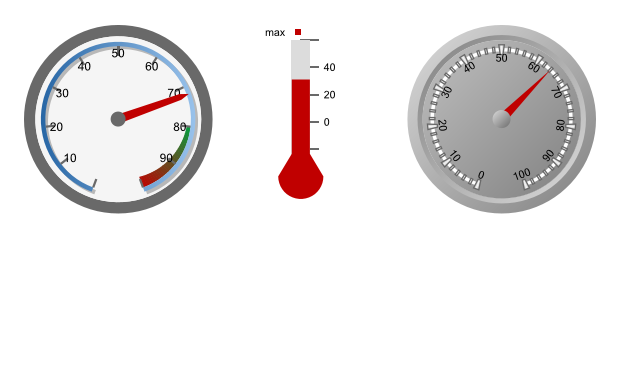
What is drawn
- Radial and linear gauges, each in its box: a radial gauge turns clockwise from six o'clock in the square of its box's shorter side, and every size on a scale — the band, a pointer's or range's width and distance, a tick mark's length, the cap — is a percentage of the scale's radius.
- Pointers: needles in all eleven
NeedleStyles, markers in every shape, bars, and thermometers — a bulbBulbSizeper cent of the gauge across, a tube in theThermometerelement's style,StandardorFlask. A thermometer moves its whole scale along by its bulb andBulbOffset, as Reporting Services does. - Pins: an enabled
MinimumPinorMaximumPinstandsLocationpast its end of the scale — degrees on a radial gauge, per cent of the length on a linear one — and a pointer past it stops there. ItsPinLabelstands beside it. - Gradients, borders and shadows on every part: all seven
BackgroundGradientTypes, in the part's own axes for a needle, a marker and a tick mark and in the page's for a band, a bar and a range; a range's ownStartToEnd, its default; a tick mark'sEnableGradient; borders in GDI+'s dashes; shadows in black at the panel'sShadowIntensity. - Frames: a gauge's and the panel's
BackFrame,SimpleorEdged, round, rectangular or rounded, at itsFrameWidth, with its face,ClipContentand the glass effect. - Caps: the default
CapStyle,RoundedDark, a flat disc in its style. - Labels turned along the scale with
RotateLabels,FontAngleandAllowUpsideDown, and a pin'sRotateLabel. In PDF and PNG a turned label is drawn as its glyphs' outlines; the page model and the browser viewer keep it as text. - The automatic interval —
Intervalleft out, as Report Builder writes it — is the gauge engine's: the step that divides the span exactly into the most of 5 to 14 intervals, half that on a linear scale. A radial 0..100 steps by 10 and a linear one by 20.
What a definition leaves out
Report Builder writes every part of a gauge, so this matters for definitions written by hand or generated:
- A part left out is the gauge engine's own. No
BackFramedraws a greyEdgedframe; no tick-mark element, shaded WhiteSmoke marks across the band; noScaleLabels, labels in Microsoft Sans Serif at 14 per cent of the gauge with both ends, turned along a radial scale; noPointerCap, a grey cap over the needle. The load gauge above is one. - A property left out of a stated part takes the schema's default where it states one and the engine's elsewhere: tick marks
Inside, a radial range 15 to 30 per cent wide and 30 per cent in from the band, a linear pointerOutside. - A style that states no border style takes the part's own: tick marks, pins and ranges are outlined, black and 1pt unless the border says otherwise. Give them
<Border><Style>None</Style></Border>to draw them without, asgauges.rdldoes. - A style that states no colour leaves a part transparent, except a scale's band, which is white; a needle, marker or bar with no style isn't drawn.
Important
A gauge in your own drawing code: a ReportShapeLabel can carry an Angle, its own constructor turning it about its run's origin, and a ReportShapePath a ReportShapeGradient. A renderer of your own that ignores them draws a turned label level and a graded part flat.
using DocWright.Core.Primitives;
using DocWright.Reporting.Pagination;

var tilted = new ReportShapeLabel("Tilted", new Twips(144), new Twips(288), new Twips(900), "Arial", new Twips(240),
    bold: false, italic: false, ColorRgb.Black, advances: null, angle: 30.0);
Console.WriteLine($"{tilted.Text}: {tilted.Angle} degrees about ({tilted.Left.ToPoints()}, {tilted.Baseline.ToPoints()})pt");
What is not drawn is named once per gauge with DXP9407 while the rest is drawn: the 47 Custom… frame shapes and AutoShape round a radial scale, the glass effect's darkening of the parts on a face, images, logarithmic, reversed and multiplied scales, custom labels, hatching (its background colour is drawn), a gradient with no end colour (its start colour), the eight shaded cap styles (a flat disc) and a cap's reflection, turned labels on a linear scale, and AutoLayout over several gauges. The automatic interval of minor tick marks is a fifth of the major one, which is not always Reporting Services'.
Next steps
- Paginate a report for the page model every gauge is part of.
- Export a report: a gauge reaches Excel and Word as a picture.
- Show reports in a browser: a gauge is one
<svg>, its turned labels still text.