Tutorial: Compare two versions of a contract
A customer sends back your services agreement with edits. Compare it against the version you sent, get one document with every difference as a real tracked change, review the changes in code, and produce the agreed version.
You will learn to:
- compare two documents into tracked changes that Word can review
- read the counts, the moved paragraphs and each individual revision
- accept or reject revisions selectively, by type or by author
Before you start
dotnet add package DocWright.Compare
Step 1: The two versions
Download agreement-v1.docx (what you sent) and agreement-v2.docx (what came back). The customer changed the fee and payment terms, deleted a sentence, added a liability clause, moved the confidentiality clause to the end and made the governing-law clause bold.
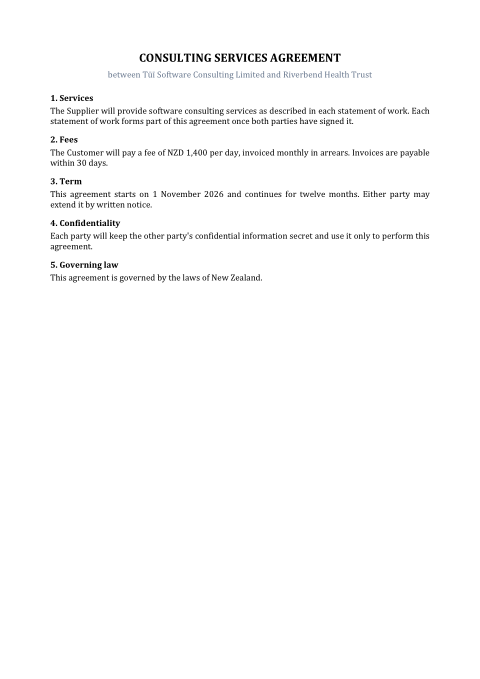 Version 1: sent
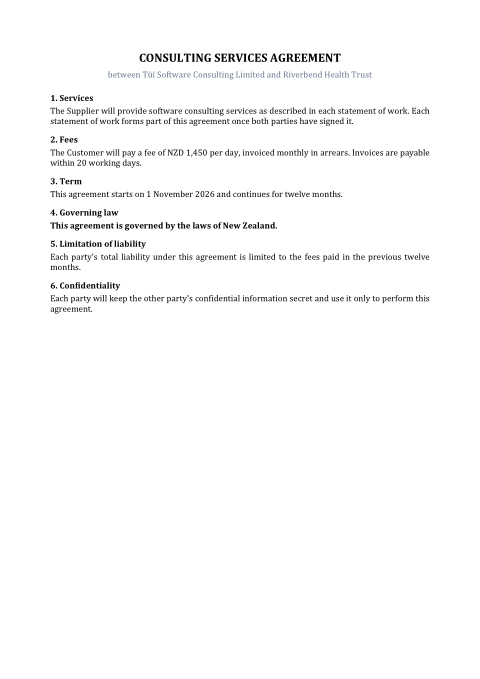 Version 2: returned
Step 2: Compare
using DocWright;
using DocWright.Compare;
using DocWright.Dom;
using DocWright.Dom.Revisions;

var converter = new DocWrightConverter();

using WordDocument original = converter.Load(File.OpenRead("agreement-v1.docx"));
using WordDocument revised = converter.Load(File.OpenRead("agreement-v2.docx"));

CompareResult result = new DocumentComparer().Compare(original, revised, new CompareOptions
{
    Author = "Contract review",
    Timestamp = "2026-10-01T09:00:00Z",   // you supply it; the clock is never read
});

Console.WriteLine($"{result.InsertionCount} insertions, {result.DeletionCount} deletions, "
                + $"{result.FormatChangeCount} formatting changes, {result.Moves.Count} move(s)");

foreach (DetectedMove move in result.Moves)
{
    Console.WriteLine($"  moved: {move.OriginalIndex} -> {move.RevisedIndex}: {move.Preview}");
}

// A .docx that opens in Word with every difference as a tracked change.
using (FileStream docx = File.Create("agreement-compared.docx"))
{
    converter.Save(result.Document, docx);
}
result.Document is the revised document carrying both versions as tracked changes. Save it and open it in Word: it reviews like any document Word compared itself. Download the output: agreement-compared.docx.
Two properties make the result trustworthy:
- Accepting every revision gives you version 2 exactly. Rejecting every revision gives you version 1 exactly. Everything else is how tidily the differences are marked.
- It is deterministic. No clock and no random IDs: the author and timestamp are values you pass in, so comparing the same files twice produces identical bytes.
Step 3: Review and resolve
Revisions can be listed and resolved from code. This keeps every wording change but rejects formatting-only changes, then accepts what is left:
using DocWright;
using DocWright.Compare;
using DocWright.Dom;
using DocWright.Dom.Revisions;

// List the changes, in document order.
foreach (Revision revision in result.Document.GetRevisions().Take(6))
{
    Console.WriteLine($"  {revision.Type,-12} {revision.Preview}");
}

// Keep every wording change but reject the formatting changes...
int rejected = result.Document.RejectRevisions(new RevisionFilter
{
    Types = [RevisionType.RunFormatting, RevisionType.ParagraphFormatting],
});

// ...then accept the rest, leaving a clean document.
int accepted = result.Document.AcceptAllRevisions();
Console.WriteLine($"Rejected {rejected} formatting change(s), accepted {accepted} revision(s).");

using (FileStream agreed = File.Create("agreement-agreed.pdf"))
{
    converter.Convert(result.Document, agreed);
}
Output (both steps)
8 insertions, 6 deletions, 1 formatting changes, 1 move(s)
  moved: 9 -> 13: Each party will keep the other party's confidential information secret and use …
  Deletion     1,400
  Insertion    1,450
  Deletion     30
  Insertion    20
  Insertion    working
  Deletion     Each party will keep the other party's confidential information secret and use …
Rejected 1 formatting change(s), accepted 20 revision(s).
Note
PDF output shows the final text, not revision marks. Drawing tracked changes (coloured insertions and struck-through deletions) in PDF or images is not implemented yet. ConvertOptions.RenderRevisions = true is accepted, but it reports a warning and renders the text with revisions applied. To show a redline, open the compared .docx in Word.
Resolving revisions
These are extension methods from DocWright.Dom.Revisions, and they work on any node: a whole document, a section, a table cell or a header.
| Call | Does |
|---|---|
GetRevisions() |
Lists every revision in document order: Type, Author, Timestamp, Preview and the affected Range. |
AcceptAllRevisions() / RejectAllRevisions() |
Resolves everything under the node. Returns the count. |
AcceptRevisions(filter) / RejectRevisions(filter) |
Resolves only revisions matching a RevisionFilter, by Author, Types, NotBefore/NotAfter or Id. |
revision.Accept() / revision.Reject() |
Resolves one. It returns false, and changes nothing, when an earlier change removed its target (IsStale). |
These work on any document with tracked changes, not only compare results. Use them to accept a reviewer's edits in bulk, or to reject everything by one author.
Compare options
| Option | Default | Use it to… |
|---|---|---|
Author, Timestamp |
"DocWright", none |
Label the revisions. The timestamp is written as given and never read from the clock. |
Granularity |
Word |
Use Character to mark "30 → 20" as one changed character instead of a replaced word. It is slower. |
IgnoreFormatting |
false |
Report wording changes only. |
IgnoreCase, IgnoreWhitespace |
false |
Treat case or whitespace differences as equal when aligning. |
MoveDetection |
Report |
Match emits a moved paragraph once with no markup. It is quieter, but rejecting then does not restore the original order. |
MinimumMoveLength |
24 |
Ignore moves of paragraphs shorter than this many characters. |
MaxBlocks, MaxTokensPerParagraph |
200,000, 100,000 | Hard limits: larger documents throw ResourceLimitExceededException instead of running unbounded. |
Next steps
- Compare documents and review revisions for every option, filter and scope.
- Styles and formatting and Fields for editing the agreed document further.
- Build a report in code to generate the agreement itself.