Work with tables
A Word table in DocWright is a Table holding TableRows that hold TableCells, and each cell holds ordinary paragraphs. This guide builds a formatted table from scratch, merges cells, and then edits a table in an existing document: inserting, moving and deleting rows and columns.
If you're filling tables from data, also see the tutorials Fill a {{placeholder}} template from JSON and Fill and update several tables. They cover repeating a template row and finding a specific table.
The model
| Type | Holds | Formatting |
|---|---|---|
Table |
Rows, and GridColumns, the column widths |
Format (TableFormat): borders, alignment, width, indent, cell margins, style, banding |
TableRow |
Cells |
Format (RowFormat): height, header row, can't split, hidden |
TableCell |
Blocks: paragraphs, and even other tables |
Format (CellFormat): width, shading, borders, merges, vertical alignment, text direction |
Rows, Cells and Blocks are DomNodeList<T>, which implements IList<T>. Indexing, Add, Insert, Remove, RemoveAt and IndexOf work as they do on any list. Every formatting property is nullable: null means "not set here", so the value comes from the table style or Word's defaults. That's also what gets written back, so a document you load and save keeps its formatting exactly as the author set it.
Build a table
using DocWright;
using DocWright.Core.Document;
using DocWright.Core.Primitives;
using DocWright.Dom;
using DocWright.Dom.Editing;

using var document = new WordDocument();
Section section = document.AppendSection();
section.AppendParagraph("Quarterly site inspections");

string[] header = ["Site", "Region", "Inspector", "Result"];
string[][] data =
[
    ["Wharf Street depot", "Auckland", "R. Ngata", "Passed"],
    ["Harbour Road yard", "Auckland", "R. Ngata", "Passed"],
    ["Mill Lane store", "Waikato", "S. Patel", "Follow-up"],
    ["Station Road office", "Waikato", "S. Patel", "Passed"],
];

// Four equal columns of 1.6 inches. Every cell starts with one empty paragraph.
Table table = section.AppendTable(rowCount: data.Length + 1, columnCount: 4, columnWidth: Twips.FromInches(1.6));

// Table-wide: centred, with a thin grey grid.
var rule = new BorderEdge { Style = "single", Width = Twips.FromEighthPoints(6), Color = new DocColor(ColorRgb.FromRgb(0x94, 0xA3, 0xB8)) };
table.Format.Alignment = ParagraphAlignment.Center;
table.Format.Borders = new TableBorders
{
    Top = rule, Bottom = rule, Left = rule, Right = rule, InsideHorizontal = rule, InsideVertical = rule,
};
table.Format.CellMargins = new TableCellMargins
{
    Left = new TableWidth(TableWidthUnit.Twips, 100),
    Right = new TableWidth(TableWidthUnit.Twips, 100),
};

// The first row is a header: shaded, bold, repeated at the top of every page, never split.
TableRow headerRow = table.Rows[0];
headerRow.Format.IsHeaderRow = true;
headerRow.Format.CantSplit = true;
for (int c = 0; c < header.Length; c++)
{
    headerRow.Cells[c].Format.Shading = new Shading { Pattern = "clear", Fill = new DocColor(ColorRgb.FromRgb(0xE0, 0xE7, 0xFF)) };
    Cells.Write(headerRow.Cells[c], header[c], new CharacterFormat { Bold = true });
}

for (int r = 0; r < data.Length; r++)
{
    TableRow row = table.Rows[r + 1];
    row.Format.Height = Twips.FromPoints(22);
    row.Format.HeightRule = HeightRule.AtLeast;      // grows if the text needs more room
    for (int c = 0; c < data[r].Length; c++)
    {
        row.Cells[c].Format.VerticalAlignment = VerticalJustification.Center;
        Cells.Write(row.Cells[c], data[r][c]);
    }
}
This uses a small helper to write into a cell:
using DocWright.Dom;
using DocWright.Dom.Editing;

internal static class Cells
{
    /// <summary>
    /// Writes text into a cell. AppendTable gives every cell one empty paragraph, so write into
    /// that paragraph: AppendParagraph would add a second one, leaving a blank line above the text.
    /// </summary>
    public static TextRun Write(TableCell cell, string text, CharacterFormat? format = null)
    {
        Paragraph paragraph = cell.Blocks.OfType<Paragraph>().FirstOrDefault() ?? cell.AppendParagraph();
        return paragraph.AppendText(text, format);
    }
}
Important
AppendTable gives every cell one empty paragraph, because Word requires at least one. cell.AppendParagraph(text) adds a second paragraph, so the cell shows a blank line above your text. Write into the existing paragraph, as Cells.Write does, or remove it first with cell.Blocks.Clear().
Things to know about the formatting:
- Units. Heights and border widths are
Twips(Twips.FromPoints,FromInches,FromEighthPoints). Widths and margins areTableWidth, which pairs aTableWidthUnit(Twips,Percent,AutoorNil) with a value. - Borders are
BorderEdgevalues:Styletakes Word's names ("single","double","dashed","nil"and so on), plus aWidthand aColor. Set them for the whole table inTableFormat.Borders, or for one cell inCellFormat.Borders. The cell's setting wins. - Shading needs a
Pattern."clear"with aFillcolour is a plain background. IsHeaderRowrepeats the row at the top of each page when a table breaks across pages.CantSplitkeeps a row's content on one page.HeightRule:AtLeastlets a row grow to fit its text,Exactclips whatever doesn't fit, andAutoignoresHeight.
Merge cells
using DocWright.Core.Document;
using DocWright.Dom;

// Vertical merge: each region appears once, spanning its rows.
// The first cell restarts the merge, the cells below continue it (and stay empty).
table.Rows[1].Cells[1].Format.VerticalMerge = VerticalMergeKind.Restart;
table.Rows[2].Cells[1].Format.VerticalMerge = VerticalMergeKind.Continue;
table.Rows[3].Cells[1].Format.VerticalMerge = VerticalMergeKind.Restart;
table.Rows[4].Cells[1].Format.VerticalMerge = VerticalMergeKind.Continue;
foreach (int r in new[] { 2, 4 })
{
    TableCell continued = table.Rows[r].Cells[1];
    continued.Blocks.Clear();
    continued.Blocks.Add(new Paragraph());
}

// Horizontal merge: a closing row whose first cell spans all four grid columns.
// Remove the cells it replaces and set GridSpan; the row's spans must add up to the grid.
TableRow total = table.Rows[^1].Clone();
table.Rows.Add(total);
while (total.Cells.Count > 1)
{
    total.Cells.RemoveAt(total.Cells.Count - 1);
}

TableCell note = total.Cells[0];
note.Format.GridSpan = 4;
note.Format.VerticalMerge = null;
note.Blocks.Clear();
note.Blocks.Add(new Paragraph());
Cells.Write(note, "4 sites inspected, 1 needs a follow-up visit.", new CharacterFormat { Italic = true });
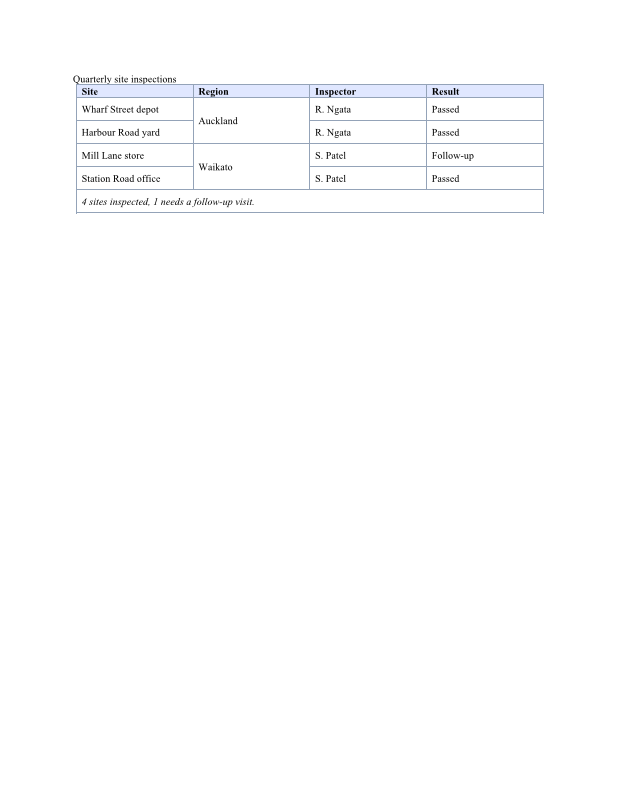
Word stores the two kinds of merge differently, and DocWright uses the same model:
- Horizontal merges are one cell with
GridSpan = n, which replacesncells. Remove the cells it replaces. Each row's spans must add up toGridColumns.Count, or the row will be ragged. - Vertical merges keep every cell. The top cell has
VerticalMerge = Restart, and each cell below it hasContinue. Only the top cell's content is shown, so keep the continued cells empty (one empty paragraph each).
Edit an existing table
using DocWright;
using DocWright.Core.Document;
using DocWright.Dom;
using DocWright.Dom.Editing;

var converter = new DocWrightConverter();
using FileStream input = File.OpenRead("inspections.docx");
using WordDocument loaded = converter.Load(input);

// The body's top-level tables, in order. document.Accept(visitor) would also reach
// tables in headers, footers and other cells.
List<Table> tables = loaded.Sections.SelectMany(s => s.Blocks.OfType<Table>()).ToList();
Table inspections = tables[0];
Console.WriteLine($"{tables.Count} table(s); the first has {inspections.Rows.Count} rows "
                + $"and {inspections.GridColumns.Count} grid columns");

// Undo vertical merges before reordering rows: a continued cell joins whatever is
// above it, so moving rows would merge the wrong cells. Copy the text down instead.
for (int c = 0; c < inspections.GridColumns.Count; c++)
{
    string above = "";
    foreach (TableRow row in inspections.Rows.Where(r => r.Cells.Count > c))
    {
        CellFormat format = row.Cells[c].Format;
        if (format.VerticalMerge == VerticalMergeKind.Continue)
        {
            Cells.Write(row.Cells[c], above);
        }

        above = row.Cells[c].GetText().Trim();
        format.VerticalMerge = null;
    }
}

// Insert a row: clone a formatted row, then change its text.
TableRow copy = inspections.Rows[4].Clone();
inspections.Rows.Insert(5, copy);
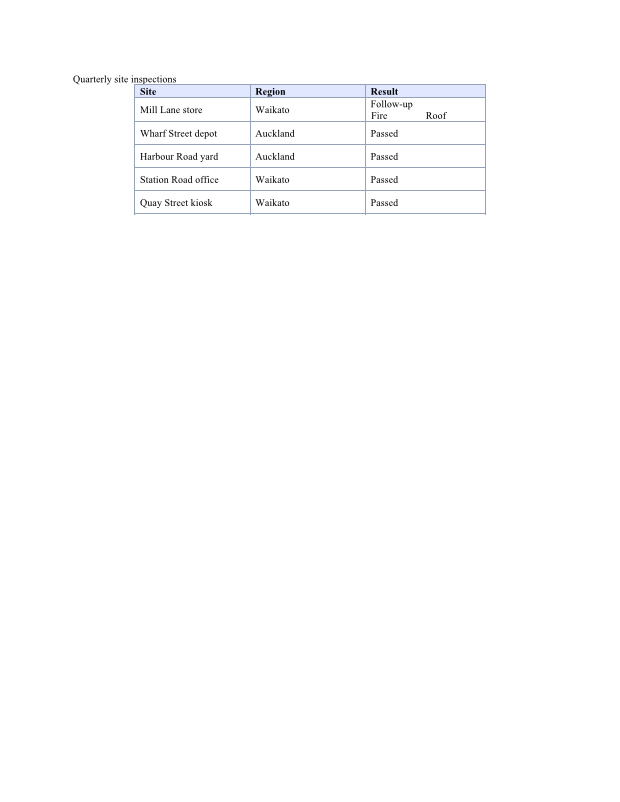
copy.Cells[0].ReplaceText("Station Road office", "Quay Street kiosk");

// Move a row: remove it and insert it elsewhere. A node has one parent at a time.
TableRow mill = inspections.Rows[3];
inspections.Rows.Remove(mill);
inspections.Rows.Insert(1, mill);

// Delete a row by index, or through the node itself.
inspections.Rows.RemoveAt(inspections.Rows.Count - 1);   // the closing note
Console.WriteLine($"after edits: {inspections.Rows.Count} rows");

// Delete a column: the cell at that index in every row, and its grid column.
const int inspector = 2;
foreach (TableRow row in inspections.Rows)
{
    row.Cells.RemoveAt(inspector);
}

inspections.GridColumns.RemoveAt(inspector);

// Read it back as rows of text.
foreach (TableRow row in inspections.Rows)
{
    Console.WriteLine("  " + string.Join(" | ", row.Cells.Select(c => c.GetText().Trim())));
}
Output
1 table(s); the first has 6 rows and 4 grid columns
after edits: 6 rows
  Site | Region | Result
  Mill Lane store | Waikato | Follow-up
  Wharf Street depot | Auckland | Passed
  Harbour Road yard | Auckland | Passed
  Station Road office | Waikato | Passed
  Quay Street kiosk | Waikato | Passed
nested tables in the first table: 1
- Finding tables.
Sections[i].Blocks.OfType<Table>()gives the body's top-level tables in order. ADomVisitor(overrideVisitTable) also reaches tables in headers, footers, text boxes and other cells. To find one particular table reliably, look for a bookmark inside it, its header text, or a marker. The multi-table tutorial compares these approaches. - Adding rows. Clone a row that already has the formatting you want.
Clone()is a deep copy with no parent, so insert it where you want it. - Moving rows. A node belongs to one parent at a time. Remove it, then insert it again.
- Undo vertical merges before reordering rows. A
Continuecell merges with whatever cell is now above it. The sample copies the merged text down and clearsVerticalMergefirst. - Deleting a column means removing that cell from every row and removing the width from
GridColumns. If the column has horizontally merged cells in it, reduce theirGridSpaninstead. - Changing text.
cell.ReplaceText(old, new)keeps the run formatting.GetText()reads a cell, a row or a whole table as plain text.
Nested tables, and deleting a table
using DocWright.Core.Primitives;
using DocWright.Dom;
using DocWright.Dom.Editing;

// A table inside a cell: AppendTable works on a TableCell too.
TableCell host = inspections.Rows[1].Cells[^1];
Table nested = host.AppendTable(rowCount: 1, columnCount: 2, columnWidth: Twips.FromInches(0.75));
Cells.Write(nested.Rows[0].Cells[0], "Fire");
Cells.Write(nested.Rows[0].Cells[1], "Roof");
Console.WriteLine($"nested tables in the first table: {inspections.Rows.SelectMany(r => r.Cells).SelectMany(c => c.Blocks).OfType<Table>().Count()}");

// Delete a whole table.
Table scratch = loaded.Sections[0].AppendTable(1, 1, Twips.FromInches(1));
scratch.Remove();
AppendTable has overloads for a Section, a TableCell, a HeaderFooter, a Note (footnote or endnote) and the WordDocument (the last section). Remove() detaches any node from its parent: a table, a row, a cell or a paragraph.
Next steps
- Create a document with the DOM for paragraphs, images, links and lists.
- Styles and formatting for styles in general. To apply a table style that is defined in the document, set
table.Format.StyleIdto its id. - Read text and walk the document to extract table contents.